Find the sensitive databefore you share the file.
Scan a document's text for PII with fixed patterns — SSNs, cards, bank details, health markers, addresses — and get a clear CLEAR, REDACT FIRST, or DO NOT SHARE. A readiness gate that refuses to pass a file with one unhandled SSN.
Scope: The PII Redaction Readiness Kit flags patterns in your own documents for your review and points to what to redact. It does not remove or mask anything itself, it is not a certified redaction tool, and it does not score or rank people. It is not legal or compliance advice — you decide what to redact and you remain responsible for what you share.
The leak isn't the messy file — it's the clean one with one thing left in.
A file goes out with a single SSN buried mid-paragraph. Everything else was fine — and that one identifier is the breach.
Nine of ten findings handled, a 90% coverage score — and the tenth is an open card number. Coverage doesn't equal cleared.
Manual PII review drifts and tires. A pattern doesn't get bored on the fortieth document.
Scan a document set, set dispositions, and watch the gate hold the file with an open SSN.
customer-record.txt
DO NOT SHARE · 75%Tap a finding to cycle its disposition: open → redact → allow.
1 high-sensitivity finding is still open, so this document is DO NOT SHARE regardless of its 75% coverage — one unhandled SSN, card, or health marker is enough to expose someone.
2 clear · 1 redact first · 2 do not share. One blocked document holds the set.
Every finding is a fixed pattern firing on the document's own text — no model, no guess. This flags what to redact; it doesn't redact for you. The workbook and the Python engine produce these exact verdicts.
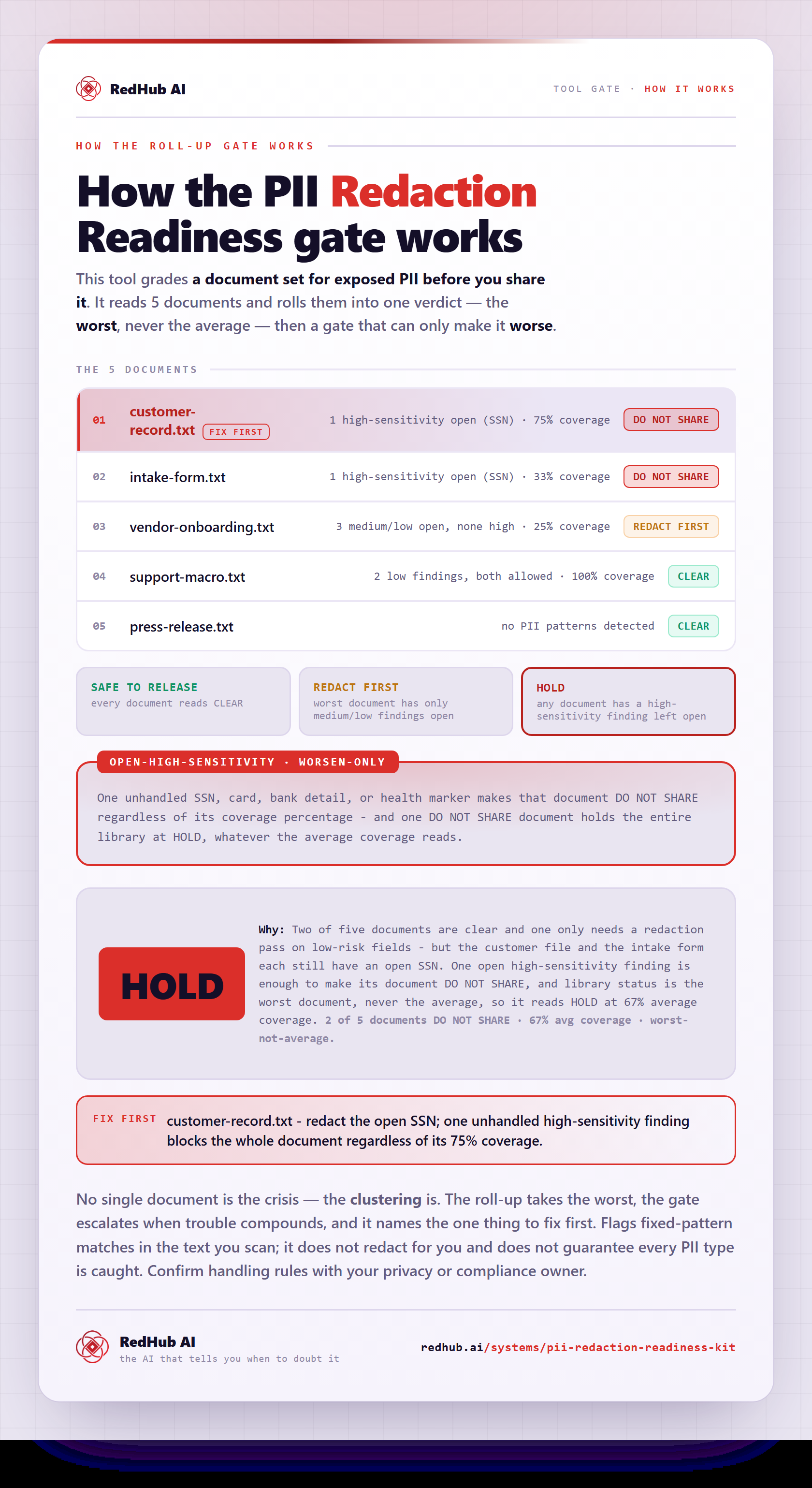
How the gate works, in one image
How the PII Redaction Readiness Kit rolls up 5 documents worst-not-average and forces DO NOT SHARE on any open high-sensitivity finding — the same math the demo runs, as a diagram you can share or embed anywhere.
View & embed the full diagramThe same verdicts from the Python engine — every pattern, every document.
======================================================================
  PII REDACTION READINESS  ·  as of 2026-06-22
======================================================================
  DOC-A press-release.txt
     findings: no PII found   coverage 100%   high-open 0   ->  CLEAR
  DOC-B support-macro.txt
     findings: low:2   coverage 100%   high-open 0   ->  CLEAR
  DOC-C vendor-onboarding.txt
     findings: medium:2, low:2   coverage 25%   high-open 0   ->  REDACT FIRST
  DOC-D customer-record.txt
     findings: high:2, medium:1, low:1   coverage 75%   high-open 1   ->  DO NOT SHARE
  DOC-E intake-form.txt
     findings: high:1, medium:1, low:1   coverage 33%   high-open 1   ->  DO NOT SHARE
----------------------------------------------------------------------
  CLEAR 2   REDACT FIRST 1   DO NOT SHARE 2
----------------------------------------------------------------------
  LIBRARY: HOLD
======================================================================
  Flags patterns for your review — it does not redact. Not legal advice.
======================================================================
DOC-D has its card and date of birth marked redact and its email allow-listed — 75% coverage — but its SSN is still open. That one open high-sensitivity finding forces DO NOT SHARE, and one blocked document holds the library. The coverage score is context; the gate decides.
Three operating principles, enforced in the scan.
Deterministic, not a model
Every finding is a fixed pattern firing on the document's own text. The same document always produces the same findings — repeatable and auditable.
One open high finding blocks release
Any high-sensitivity finding left open forces DO NOT SHARE regardless of coverage. An unhandled SSN, card, or health marker is dispositive.
You set the tiers and dispositions
You decide which detectors are high-sensitivity and whether each finding is redacted or allowed — the gate keys off your decisions.
A readiness gate that points to the PII — not a redactor, not a guarantee.
- A deterministic scanner that finds PII patterns in document text — same input, same findings.
- A review surface where you tier each finding and decide redact or allow.
- An exposure gate that blocks release on an unhandled high-sensitivity finding.
- Tunable — edit the pattern pack and tiers for your own documents and identifiers.
- A redactor — it points to what to redact; you remove it in your own tools.
- A certified or guaranteed-complete PII tool — it catches the patterns you define.
- A people-scoring tool — it scans documents, not individuals.
- Legal or compliance advice — you decide what to share and stay responsible for it.
Scope: The PII Redaction Readiness Kit flags patterns in your own documents for your review and points to what to redact. It does not remove or mask anything itself, it is not a certified redaction tool, and it does not score or rank people. It is not legal or compliance advice — you decide what to redact and you remain responsible for what you share.
Anyone who sends documents out and needs to know what's in them first.
- Ops and support teams sharing files, exports, and attachments.
- Anyone preparing a document for a vendor, client, or public channel.
- Teams with an AI-use or data-handling policy to actually enforce.
- Builders who want a deterministic pre-share check in a pipeline.
- Performing the actual redaction (this points to it; your tools do it).
- A certified-complete compliance guarantee on a regulated dataset.
- Scoring or ranking people — it scans document text only.
Extract, validate, scan — the honest document sequence.
Document Field Validator
Validate the fields by rule, then scan the same documents for PII before they leave the building.
ViewAI Document Extraction Kit
Extract structured data with a model that flags low-confidence fields — the upstream of the document line.
ViewAI Governance & Acceptable Use Starter Kit
Set the policy for how your team handles sensitive data — this kit checks the policy is met before sharing.
ViewStraight answers on what it detects, what it blocks, and what it won't do.
No — and this is the most important thing to understand about it. It is a readiness gate, not a redactor. It scans a document's text, points to exactly what's sensitive and what's still exposed, and gives you a CLEAR / REDACT FIRST / DO NOT SHARE verdict — but it never removes or masks anything itself. You do the redaction in your own tools, and you remain responsible for what you share. It tells you what to fix; it doesn't fix it for you.
It runs a pattern pack of ten deterministic detectors across three sensitivity tiers: high (US Social Security numbers, credit/debit card numbers, bank routing, health/medical markers), medium (labeled dates of birth, US street addresses, employer ID/TIN), and low (email addresses, phone numbers, IP addresses). Each finding is a fixed regular-expression match on the document's own text — no model, no guessing — so the same document always produces the same findings. The pattern pack and tiers are editable for your own identifiers and documents.
Because of the exposure gate. Any high-sensitivity finding left open — not yet marked redacted or allowed — forces DO NOT SHARE regardless of how high the coverage score is. In the worked example a customer record has its card and date of birth handled (75% coverage) but one SSN still open, and that single unhandled high finding blocks it. One open SSN is enough to expose a person, so it's dispositive. The coverage score is context only; the gate decides.
No. A CLEAR verdict means none of the patterns you've defined matched an unhandled finding — it is not proof the document is PII-free. A detector can miss data it wasn't written to catch (an unusual format, a foreign identifier, PII embedded in an image), so CLEAR is a strong signal, not a certification. It is not a certified or guaranteed-complete redaction tool, and it is not legal or compliance advice. Treat it as a deterministic safety net you tune, not a final sign-off.
When you scan a set of documents, the per-document verdicts roll up into one library verdict: SAFE TO RELEASE (every document is CLEAR), REDACT FIRST (some need redaction but none are blocked), or HOLD (at least one document is DO NOT SHARE). One blocked document holds the whole set — so a single file with an open SSN keeps the batch on HOLD until it's handled, rather than letting it ship alongside the clean ones.
They're opposite-facing halves of the document line. The Document Field Validator checks whether a record's fields are correct (formats, ranges, math) and rejects bad data. This scans assembled document text for sensitive content that must be handled before the file is shared or stored. One asks 'is this data right?'; the other asks 'is it safe to send?'. They pair: validate the fields by rule, then scan the same documents for PII before they leave the building. It also pairs with the AI Governance & Acceptable Use Starter Kit, which sets the policy this kit operationally checks.
New to the document-ops line? Run the Document Processing Pipeline Diagnostic first — it scores your workflow across six stages and, where a stage is short, routes you to the exact drop that fixes your bottleneck.
Know what's in the file.
Before it leaves.
One purchase, lifetime access, 12 months of updates. $89, once.
Scope: flags patterns in your own documents for your review; does not redact, does not score or rank people; not legal or compliance advice.
Sold by RedHub AI LLC · Secured by Stripe · redhub.ai