Tool Gate · How it works
How the Exec AI Briefing gate works
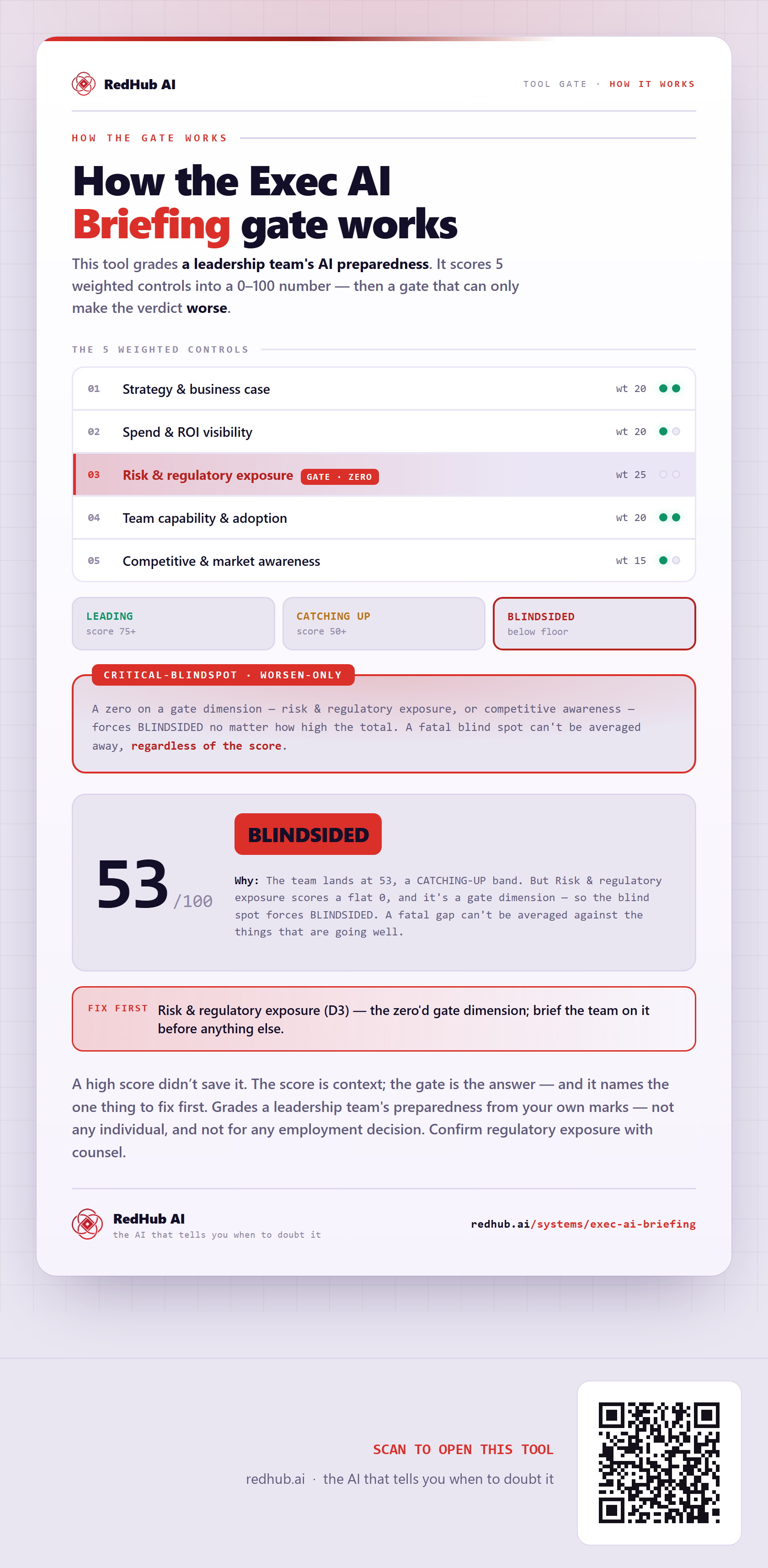
How the Exec AI Briefing grades a leadership team: five weighted dimensions into a 0–100 total, and a critical-blindspot gate where a zero on risk/regulatory or competitive awareness forces BLINDSIDED — which is how a 53 in the CATCHING-UP band still reads BLINDSIDED.
How the gate works
This tool grades a leadership team's AI preparedness. Each control is marked from your own evidence and weighted into a 0–100 score — and then the score is run past a gate that can only make the verdict worse.
The 5 weighted controls
| Signal | Weight |
|---|---|
| Strategy & business case | 20 |
| Spend & ROI visibility | 20 |
| Risk & regulatory exposure | 25 |
| Team capability & adoption | 20 |
| Competitive & market awareness | 15 |
| Total | 100 |
The verdict bands
A zero on a gate dimension — risk & regulatory exposure, or competitive awareness — forces BLINDSIDED no matter how high the total. A critical blind spot can't be averaged away, regardless of the score.
In the worked sample it scores 53 out of 100 and still reads BLINDSIDED — The team lands at 53, a CATCHING-UP band. But Risk & regulatory exposure scores a flat 0, and it's a gate dimension — so the blind spot forces BLINDSIDED. A gate-triggering gap can't be averaged against the things that are going well. Marked fix first on this sample: Risk & regulatory exposure (D3) — the zero'd gate dimension; brief the team on it before anything else.
Common questions
Can something score well on the Exec AI Briefing gate and still fail?
Yes. The weighted score is run past a worsen-only gate — the Critical-blindspot — that can only make the verdict worse. In the worked sample it scores 53 out of 100 and still reads BLINDSIDED, because the team lands at 53, a CATCHING-UP band. But Risk & regulatory exposure scores a flat 0, and it's a gate dimension — so the blind spot forces BLINDSIDED. A gate-triggering gap can't be averaged against the things that are going well.
What is a worsen-only gate?
A rule that can only lower a verdict, never raise it. One gate-triggering gap overrides an otherwise-good score, because a single gate-triggering gap shouldn't hide behind a high average. Where something is short, the fix-first row names it — here, "Risk & regulatory exposure (D3) — the zero'd gate dimension; brief the team on it before anything else.".
Grades a leadership team's preparedness from your own marks — not any individual, and not for any employment decision. Confirm regulatory exposure with counsel.
Embed this diagram
Free to share and embed with attribution (CC BY 4.0) — keep the link to redhub.ai.
Interactive — renders the live diagram
<iframe src="https://redhub.ai/visuals/tool/exec-ai-briefing.html" title="How the Exec AI Briefing gate works — RedHub AI" width="760" height="1595" loading="lazy" style="border:0;width:100%;max-width:760px"></iframe>
<p style="font:14px/1.5 system-ui,sans-serif"><a href="https://redhub.ai/visuals/tool/exec-ai-briefing">How the Exec AI Briefing gate works</a> — by <a href="https://redhub.ai">RedHub AI</a>, the AI that tells you when to doubt it.</p>
Image + link — a static picture for any blog
<a href="https://redhub.ai/visuals/tool/exec-ai-briefing"><img src="https://redhub.ai/visuals/tool/exec-ai-briefing-share.png" alt="Diagram of the Exec AI Briefing: five weighted dimensions, a critical-blindspot gate, and a team scoring 53 that still reads BLINDSIDED." width="760" loading="lazy" style="max-width:100%;height:auto;border-radius:16px"></a>
<p style="font:14px/1.5 system-ui,sans-serif"><a href="https://redhub.ai">RedHub AI</a> — the AI that tells you when to doubt it.</p>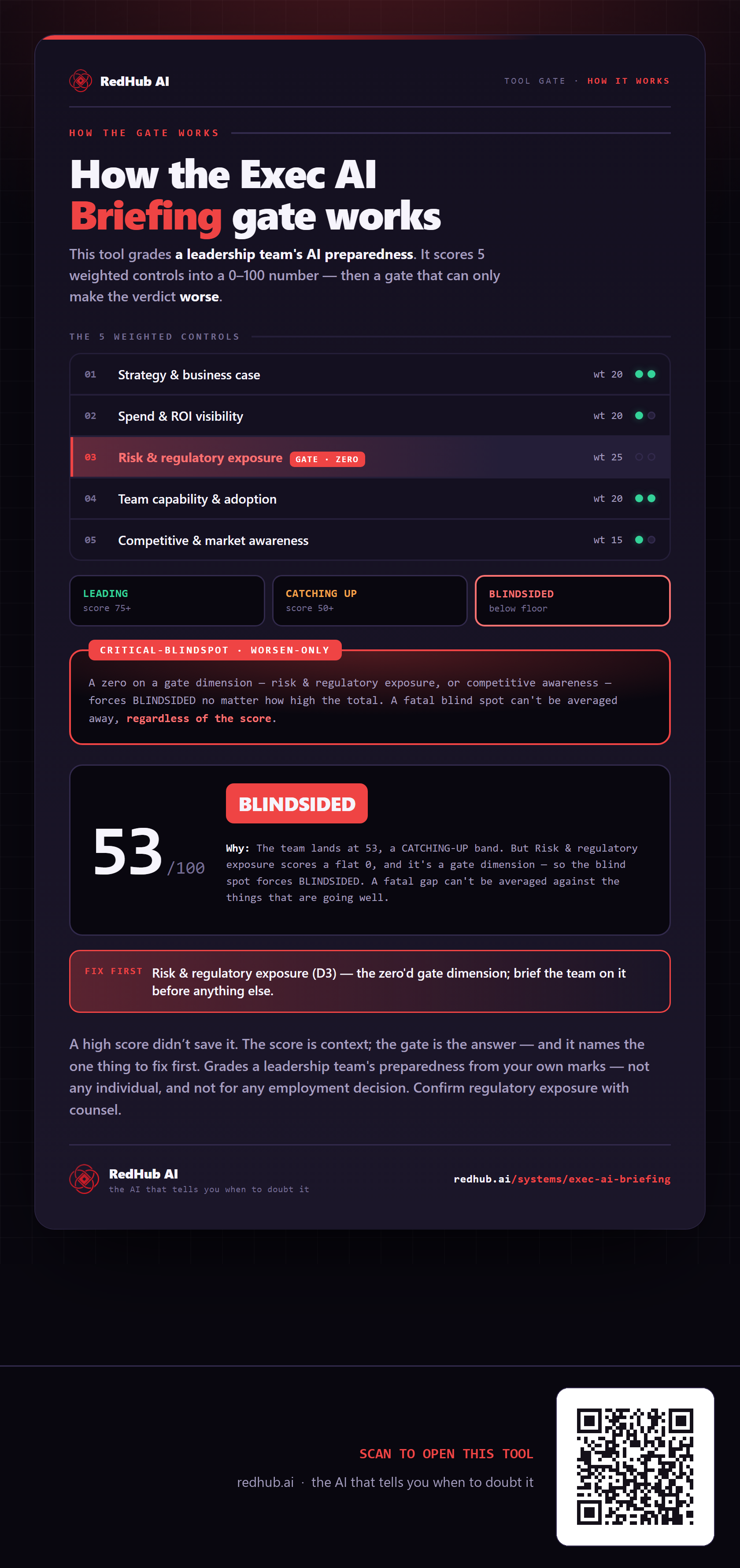
This is how Exec AI Briefing works. More diagrams in the Visual Field Guide.