Tool Gate · How it works
How the Document Pipeline Diagnostic gate works
How the Document Pipeline Diagnostic scores six workflow stages and takes the minimum, not the mean: a stall gate blocks on any stage at or below 40, and, where a stage is short, it routes you to the exact fix — which is how a pipeline averaging 73 still reads MANUAL DRAG on its weakest stage.
How the gate works
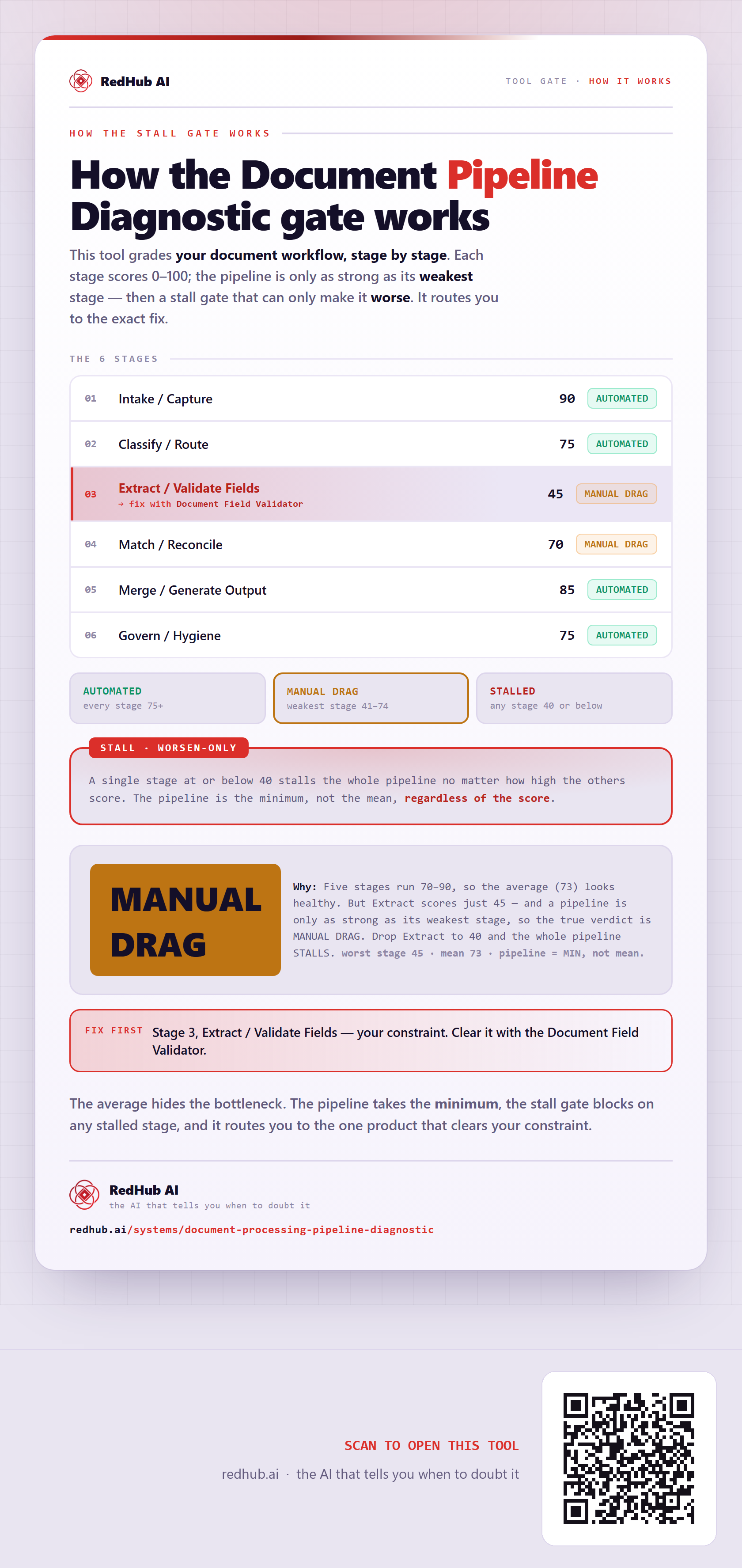
This tool grades your document workflow, stage by stage. Each stage scores 0–100; the pipeline is only as strong as its weakest stage — then a stall gate that can only make it worse. Where a stage is stalled, it names the constraint.
The 6 stages
| Stage | Score |
|---|---|
| 1. Intake / Capture | 90 AUTOMATED |
| 2. Classify / Route | 75 AUTOMATED |
| 3. Extract / Validate Fields→ fix with Document Field Validator | 45 MANUAL DRAG |
| 4. Match / Reconcile | 70 MANUAL DRAG |
| 5. Merge / Generate Output | 85 AUTOMATED |
| 6. Govern / Hygiene | 75 AUTOMATED |
The verdict bands
A single stage at or below 40 stalls the whole pipeline no matter how high the others score. The pipeline is the minimum, not the mean, regardless of the score.
In the worked sample it reads MANUAL DRAG — Five stages run 70–90, so the average (73) looks healthy. But Extract scores just 45 — and a pipeline is only as strong as its weakest stage, so the true verdict is MANUAL DRAG. Drop Extract to 40 and the whole pipeline STALLS. Marked fix first on this sample: Stage 3, Extract / Validate Fields — your constraint. Clear it with the Document Field Validator.
Common questions
Can the average look healthy on the Document Pipeline Diagnostic gate and the pipeline still be blocked?
Yes. The pipeline is the minimum of its stages, not the mean; a worsen-only Stall gate blocks on any stalled stage, and where a stage is stalled it names the constraint to clear. In the worked sample it reads MANUAL DRAG because five stages run 70–90, so the average (73) looks healthy. But Extract scores just 45 — and a pipeline is only as strong as its weakest stage, so the true verdict is MANUAL DRAG. Drop Extract to 40 and the whole pipeline STALLS.
What is a worsen-only gate?
A rule that can only lower a verdict, never raise it. One gate-triggering gap overrides an otherwise-high average, because a single gate-triggering gap shouldn't hide behind the stages that run clean. Where something is short, the fix-first row names it — here, "Stage 3, Extract / Validate Fields — your constraint. Clear it with the Document Field Validator.".
Embed this diagram
Free to share and embed with attribution (CC BY 4.0) — keep the link to redhub.ai.
Interactive — renders the live diagram
<iframe src="https://redhub.ai/visuals/tool/document-processing-pipeline-diagnostic.html" title="How the Document Pipeline Diagnostic gate works — RedHub AI" width="760" height="1640" loading="lazy" style="border:0;width:100%;max-width:760px"></iframe>
<p style="font:14px/1.5 system-ui,sans-serif"><a href="https://redhub.ai/visuals/tool/document-processing-pipeline-diagnostic">How the Document Pipeline Diagnostic gate works</a> — by <a href="https://redhub.ai">RedHub AI</a>, the AI that tells you when to doubt it.</p>
Image + link — a static picture for any blog
<a href="https://redhub.ai/visuals/tool/document-processing-pipeline-diagnostic"><img src="https://redhub.ai/visuals/tool/document-processing-pipeline-diagnostic-share.png" alt="Diagram of the Document Pipeline Diagnostic: six stages scored, a stall gate, routing to the constraint's fixer product, and a pipeline reading MANUAL DRAG at a mean of 73." width="760" loading="lazy" style="max-width:100%;height:auto;border-radius:16px"></a>
<p style="font:14px/1.5 system-ui,sans-serif"><a href="https://redhub.ai">RedHub AI</a> — the AI that tells you when to doubt it.</p>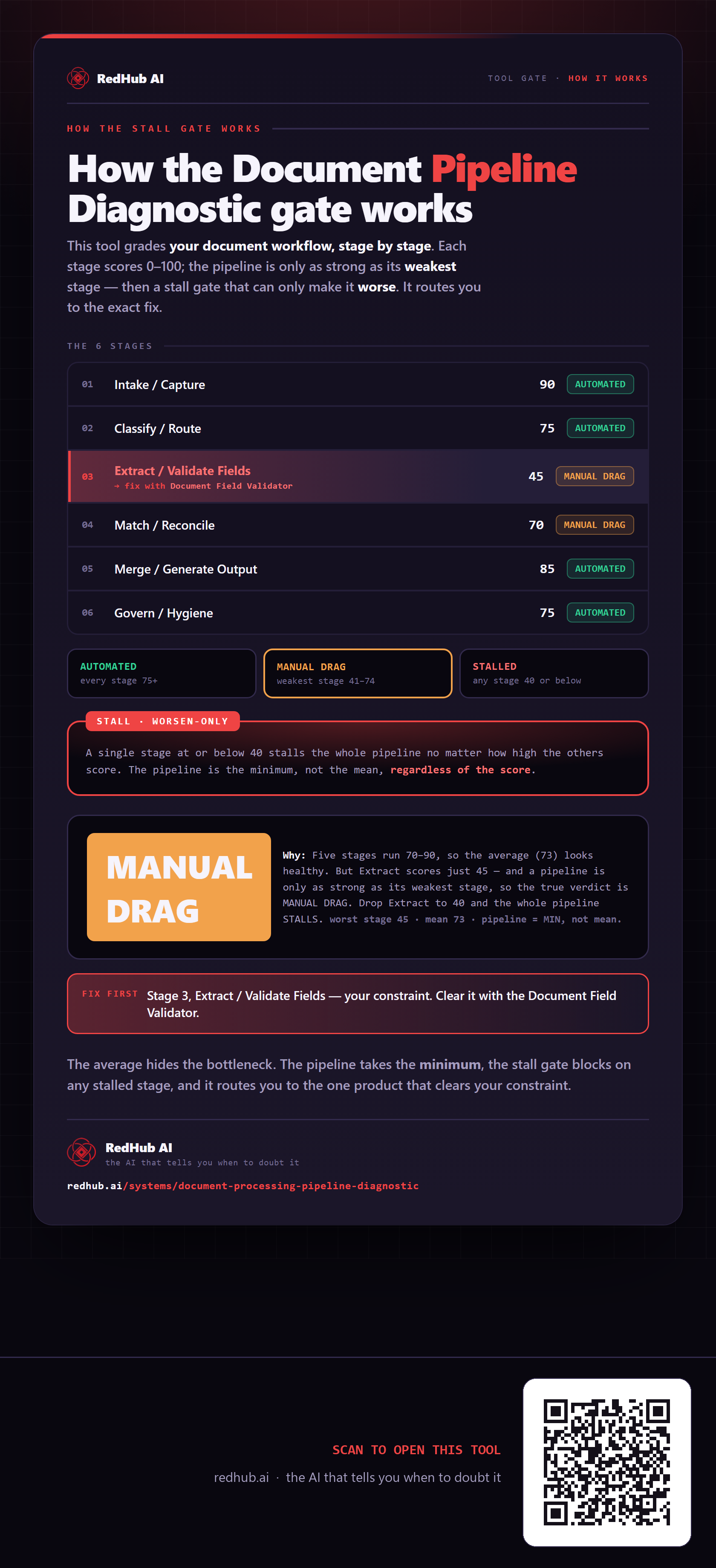
This is how Document Processing Pipeline Diagnostic works. More diagrams in the Visual Field Guide.