Tool Gate · How it works
How the AI Incident Postmortem gate works
How the AI Incident Postmortem Readiness Gate grades a writeup: six weighted sections into a 0–100 completeness score, and an open-critical-action gate where any open critical action item forces NOT CLOSEABLE — which is how a perfect 100 still can't close.
How the gate works
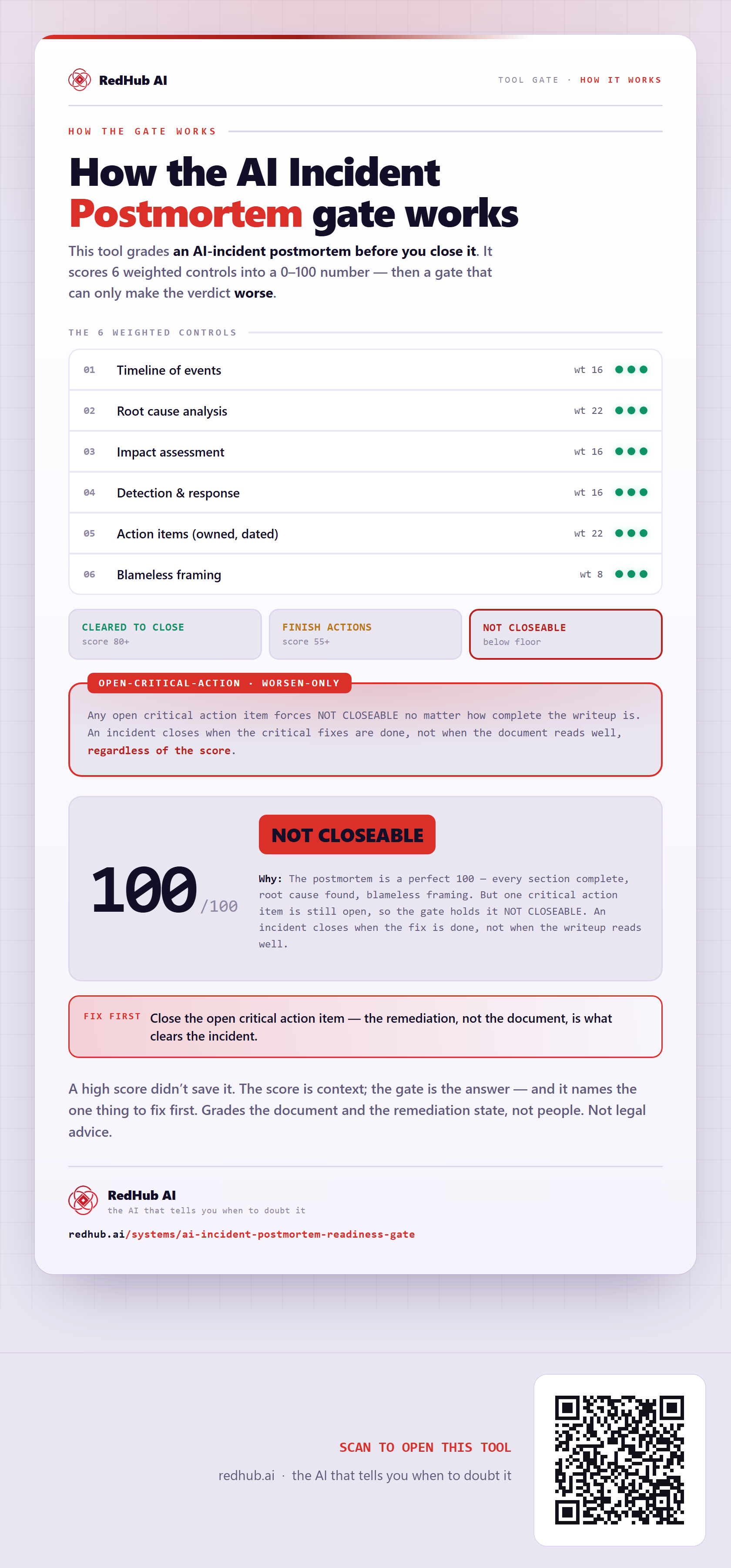
This tool grades an AI-incident postmortem before you close it. Each control is marked from your own evidence and weighted into a 0–100 score — and then the score is run past a gate that can only make the verdict worse.
The 6 weighted controls
| Signal | Weight |
|---|---|
| Timeline of events | 16 |
| Root cause analysis | 22 |
| Impact assessment | 16 |
| Detection & response | 16 |
| Action items (owned, dated) | 22 |
| Blameless framing | 8 |
| Total | 100 |
The verdict bands
Any open critical action item forces NOT CLOSEABLE no matter how complete the writeup is. An incident closes when the critical fixes are done, not when the document reads well, regardless of the score.
In the worked sample it scores 100 out of 100 and still reads NOT CLOSEABLE — The postmortem is a perfect 100 — every section complete, root cause found, blameless framing. But one critical action item is still open, so the gate holds it NOT CLOSEABLE. An incident closes when the fix is done, not when the writeup reads well. Marked fix first on this sample: Close the open critical action item — the remediation, not the document, is what clears the incident.
Common questions
Can something score well on the AI Incident Postmortem gate and still fail?
Yes. The weighted score is run past a worsen-only gate — the Open-critical-action — that can only make the verdict worse. In the worked sample it scores 100 out of 100 and still reads NOT CLOSEABLE, because the postmortem is a perfect 100 — every section complete, root cause found, blameless framing. But one critical action item is still open, so the gate holds it NOT CLOSEABLE. An incident closes when the fix is done, not when the writeup reads well.
What is a worsen-only gate?
A rule that can only lower a verdict, never raise it. One gate-triggering gap overrides an otherwise-good score, because a single gate-triggering gap shouldn't hide behind a high average. Where something is short, the fix-first row names it — here, "Close the open critical action item — the remediation, not the document, is what clears the incident.".
Grades the document and the remediation state, not people. Not legal advice.
Embed this diagram
Free to share and embed with attribution (CC BY 4.0) — keep the link to redhub.ai.
Interactive — renders the live diagram
<iframe src="https://redhub.ai/visuals/tool/ai-incident-postmortem-readiness-gate.html" title="How the AI Incident Postmortem gate works — RedHub AI" width="760" height="1660" loading="lazy" style="border:0;width:100%;max-width:760px"></iframe>
<p style="font:14px/1.5 system-ui,sans-serif"><a href="https://redhub.ai/visuals/tool/ai-incident-postmortem-readiness-gate">How the AI Incident Postmortem gate works</a> — by <a href="https://redhub.ai">RedHub AI</a>, the AI that tells you when to doubt it.</p>
Image + link — a static picture for any blog
<a href="https://redhub.ai/visuals/tool/ai-incident-postmortem-readiness-gate"><img src="https://redhub.ai/visuals/tool/ai-incident-postmortem-readiness-gate-share.png" alt="Diagram of the AI Incident Postmortem Readiness Gate: six weighted sections, an open-critical-action gate, and a postmortem scoring 100 that still reads NOT CLOSEABLE." width="760" loading="lazy" style="max-width:100%;height:auto;border-radius:16px"></a>
<p style="font:14px/1.5 system-ui,sans-serif"><a href="https://redhub.ai">RedHub AI</a> — the AI that tells you when to doubt it.</p>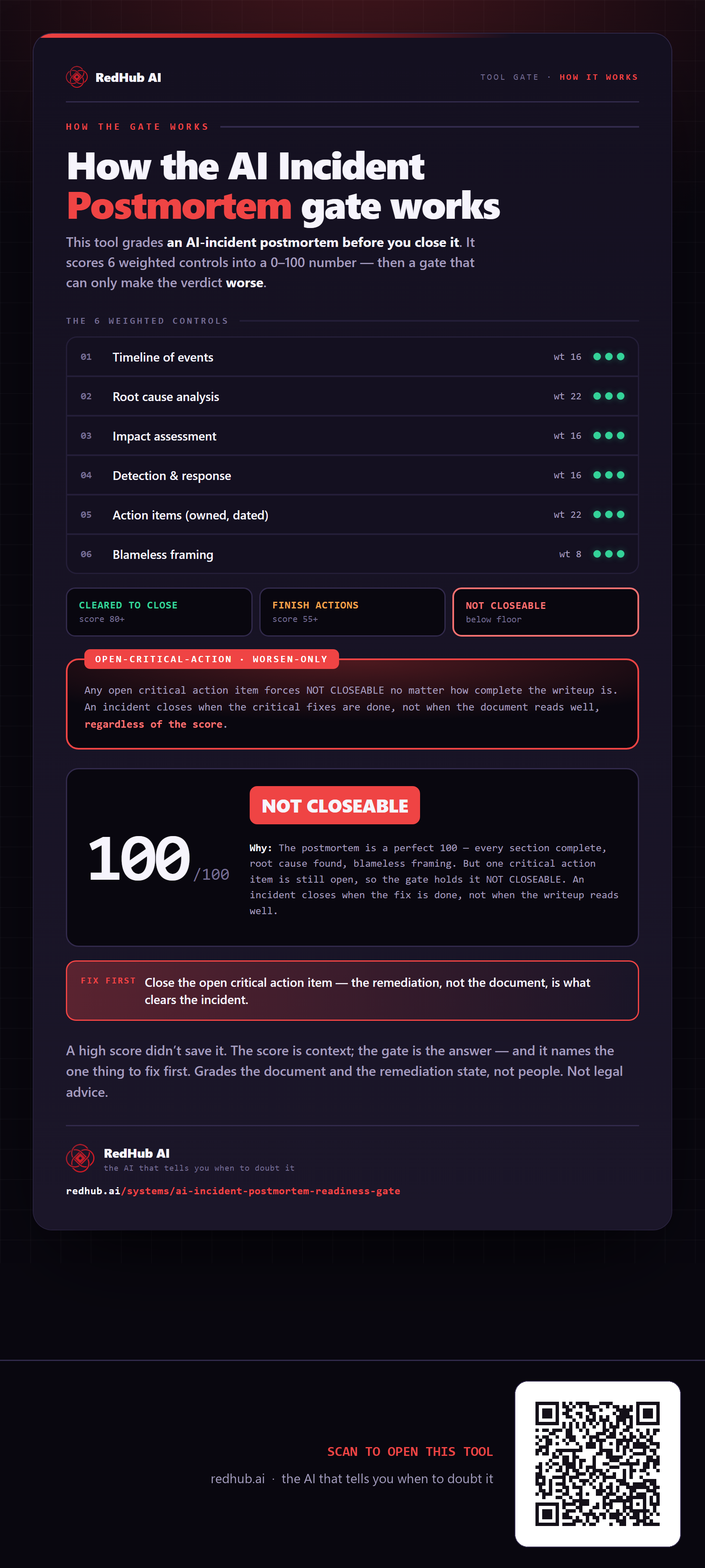
This is how AI Incident Postmortem Readiness Gate works. More diagrams in the Visual Field Guide.