Tool Gate · How it works
How the Meeting-to-Action Handoff Gate gate works
How the Meeting-to-Action Handoff Gate grades each action item on 5 checks — named owner, due date, acceptance, system of record, definition of done — TRACKED, CHASE, or DROPPED, with an owner gate that drops any unowned item: the meeting reads the worst item, so one dropped action reads HANDOFF BROKEN.
How the gate works
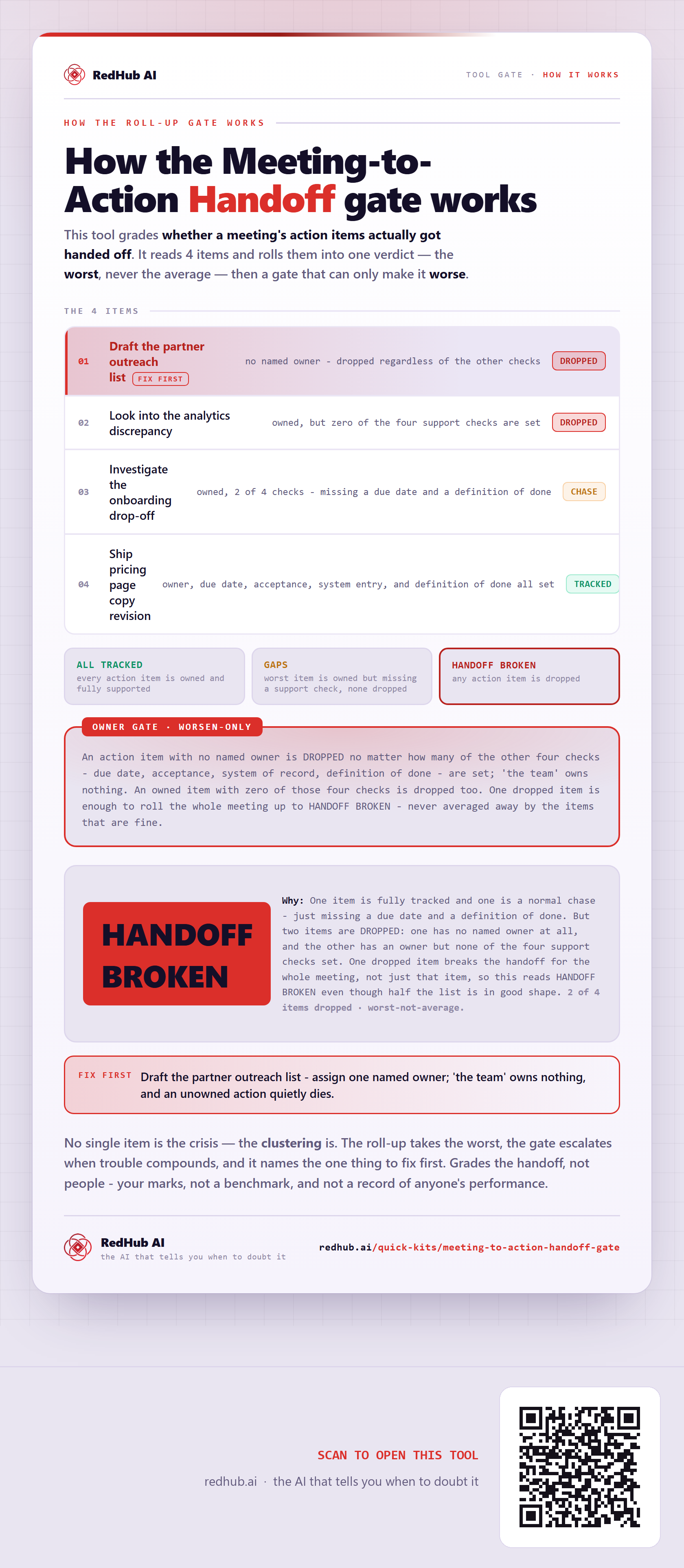
This tool grades whether a meeting's action items actually got handed off. It reads 4 items and rolls them into one verdict — the worst, never the average — and then a gate that can only make it worse.
The 4 items
| Item | Verdict |
|---|---|
| Draft the partner outreach listfix first | DROPPEDno named owner - dropped regardless of the other checks |
| Look into the analytics discrepancy | DROPPEDowned, but zero of the four support checks are set |
| Investigate the onboarding drop-off | CHASEowned, 2 of 4 checks - missing a due date and a definition of done |
| Ship pricing page copy revision | TRACKEDowner, due date, acceptance, system entry, and definition of done all set |
The verdict bands
An action item with no named owner is DROPPED no matter how many of the other four checks - due date, acceptance, system of record, definition of done - are set; 'the team' owns nothing. An owned item with zero of those four checks is dropped too. One dropped item is enough to roll the whole meeting up to HANDOFF BROKEN - never averaged away by the items that are fine.
In the worked sample it reads HANDOFF BROKEN — One item is fully tracked and one is a normal chase - just missing a due date and a definition of done. But two items are DROPPED: one has no named owner at all, and the other has an owner but none of the four support checks set. One dropped item breaks the handoff for the whole meeting, not just that item, so this reads HANDOFF BROKEN even though half the list is in good shape. Marked fix first on this sample: Draft the partner outreach list - assign one named owner; 'the team' owns nothing, and an unowned action quietly dies.
Common questions
Can every item look survivable on the Meeting-to-Action Handoff gate and the company still read HANDOFF BROKEN?
Yes. The roll-up takes the worst of 4 items — never the average — then a worsen-only gate, the Owner gate gate, escalates when trouble clusters. In the worked sample it reads HANDOFF BROKEN because one item is fully tracked and one is a normal chase - just missing a due date and a definition of done. But two items are DROPPED: one has no named owner at all, and the other has an owner but none of the four support checks set. One dropped item breaks the handoff for the whole meeting, not just that item, so this reads HANDOFF BROKEN even though half the list is in good shape.
What is a worsen-only gate?
A rule that can only lower a verdict, never raise it. One gate-triggering gap overrides an otherwise-set of survivable lines, because a single gate-triggering gap shouldn't hide behind an average of the healthy ones. Where something is short, the fix-first row names it — here, "Draft the partner outreach list - assign one named owner; 'the team' owns nothing, and an unowned action quietly dies.".
Grades the handoff, not people - your marks, not a benchmark, and not a record of anyone's performance.
Embed this diagram
Free to share and embed with attribution (CC BY 4.0) — keep the link to redhub.ai.
Interactive — renders the live diagram
<iframe src="https://redhub.ai/visuals/tool/meeting-to-action-handoff-gate.html" title="How the Meeting-to-Action Handoff Gate gate works — RedHub AI" width="760" height="1843" loading="lazy" style="border:0;width:100%;max-width:760px"></iframe>
<p style="font:14px/1.5 system-ui,sans-serif"><a href="https://redhub.ai/visuals/tool/meeting-to-action-handoff-gate">How the Meeting-to-Action Handoff Gate gate works</a> — by <a href="https://redhub.ai">RedHub AI</a>, the AI that tells you when to doubt it.</p>
Image + link — a static picture for any blog
<a href="https://redhub.ai/visuals/tool/meeting-to-action-handoff-gate"><img src="https://redhub.ai/visuals/tool/meeting-to-action-handoff-gate-share.png" alt="Diagram of the Meeting-to-Action Handoff Gate: a meeting's action items rolled up to the worst, an owner gate, and the meeting reading HANDOFF BROKEN on one unowned item." width="760" loading="lazy" style="max-width:100%;height:auto;border-radius:16px"></a>
<p style="font:14px/1.5 system-ui,sans-serif"><a href="https://redhub.ai">RedHub AI</a> — the AI that tells you when to doubt it.</p>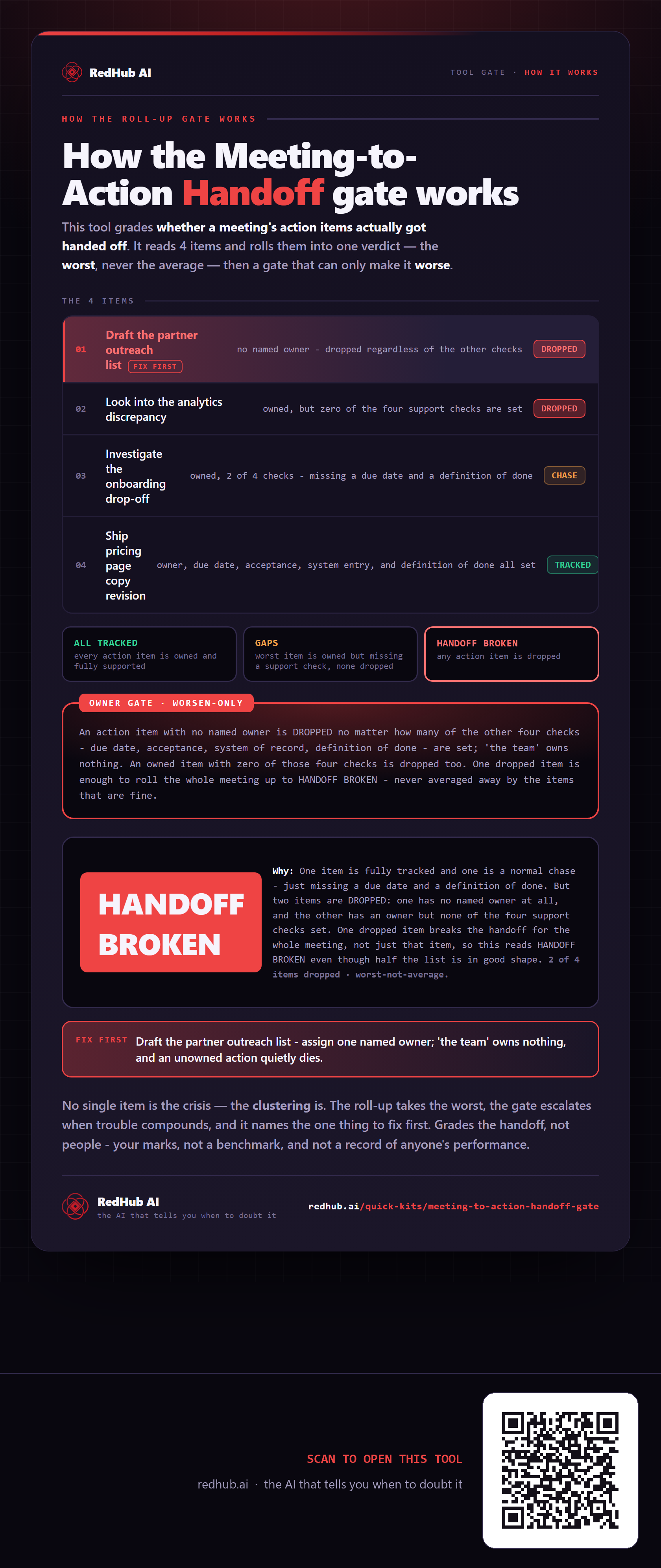
This is how Meeting-to-Action Handoff Gate works. More diagrams in the Visual Field Guide.