Tool Gate · How it works
How the Handoff Packet Generator gate works
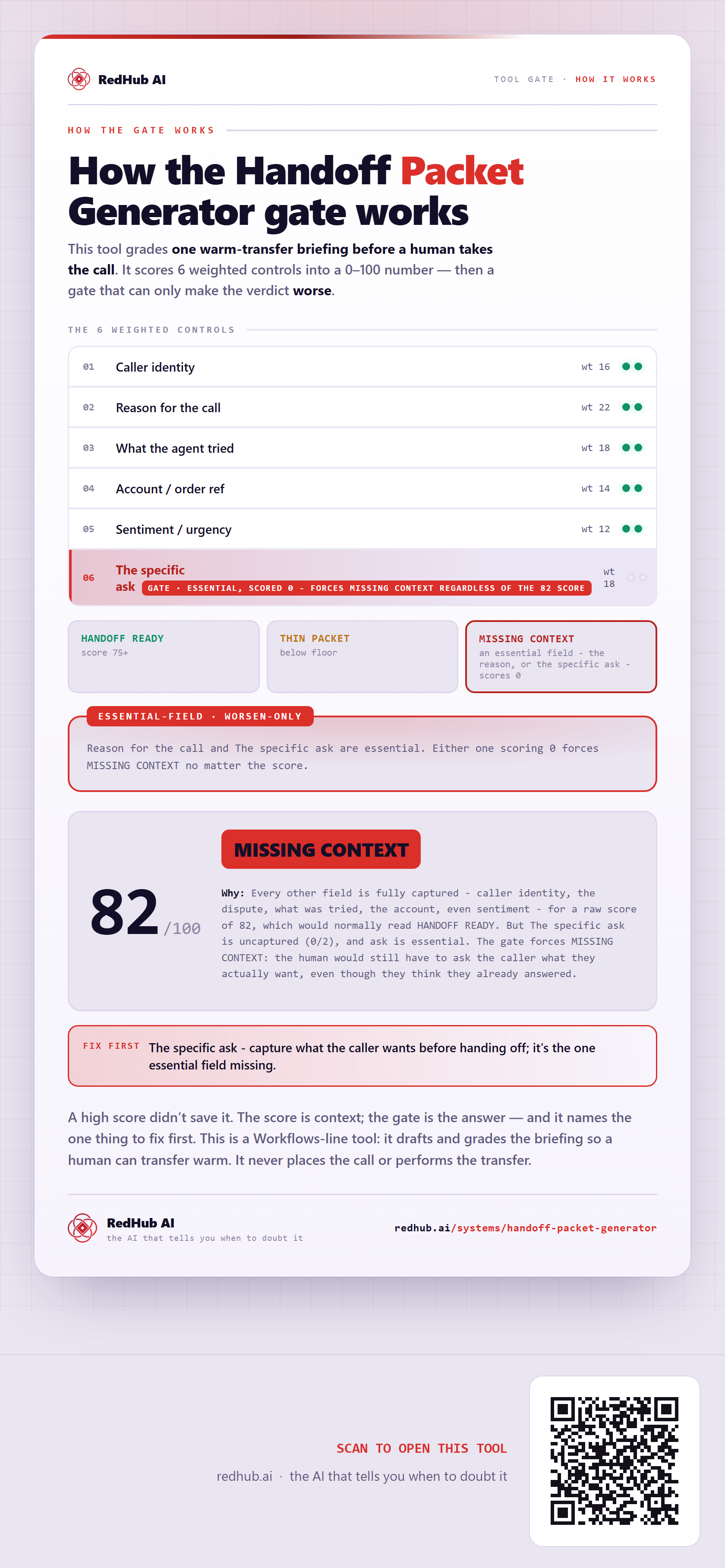
How the Handoff Packet Generator scores 6 packet fields to 100: an essential-field gate forces a distinct MISSING CONTEXT verdict — outside the score bands — when the one specific ask isn't captured, which is how the sample scores 82, in the HANDOFF READY range, and still reads MISSING CONTEXT.
How the gate works
This tool grades one warm-transfer briefing before a human takes the call. Each control is marked from your own evidence and weighted into a 0–100 score — and then the score is run past a gate that can only make the verdict worse.
The 6 weighted controls
| Signal | Weight |
|---|---|
| Caller identity | 16 |
| Reason for the call | 22 |
| What the agent tried | 18 |
| Account / order ref | 14 |
| Sentiment / urgency | 12 |
| The specific ask | 18 |
| Total | 100 |
The verdict bands
Reason for the call and The specific ask are essential. Either one scoring 0 forces MISSING CONTEXT no matter the score.
In the worked sample it scores 82 out of 100 and still reads MISSING CONTEXT — Every other field is fully captured - caller identity, the dispute, what was tried, the account, even sentiment - for a raw score of 82, which would normally read HANDOFF READY. But The specific ask is uncaptured (0/2), and ask is essential. The gate forces MISSING CONTEXT: the human would still have to ask the caller what they actually want, even though they think they already answered. Marked fix first on this sample: The specific ask - capture what the caller wants before handing off; it's the one essential field missing.
Common questions
Can something score well on the Handoff Packet Generator gate and still fail?
Yes. The weighted score is run past a worsen-only gate — the Essential-field — that can only make the verdict worse. In the worked sample it scores 82 out of 100 and still reads MISSING CONTEXT, because every other field is fully captured - caller identity, the dispute, what was tried, the account, even sentiment - for a raw score of 82, which would normally read HANDOFF READY. But The specific ask is uncaptured (0/2), and ask is essential. The gate forces MISSING CONTEXT: the human would still have to ask the caller what they actually want, even though they think they already answered.
What is a worsen-only gate?
A rule that can only lower a verdict, never raise it. One gate-triggering gap overrides an otherwise-good score, because a single gate-triggering gap shouldn't hide behind a high average. Where something is short, the fix-first row names it — here, "The specific ask - capture what the caller wants before handing off; it's the one essential field missing.".
This is a Workflows-line tool: it drafts and grades the briefing so a human can transfer warm. It never places the call or performs the transfer.
Embed this diagram
Free to share and embed with attribution (CC BY 4.0) — keep the link to redhub.ai.
Interactive — renders the live diagram
<iframe src="https://redhub.ai/visuals/tool/handoff-packet-generator.html" title="How the Handoff Packet Generator gate works — RedHub AI" width="760" height="1729" loading="lazy" style="border:0;width:100%;max-width:760px"></iframe>
<p style="font:14px/1.5 system-ui,sans-serif"><a href="https://redhub.ai/visuals/tool/handoff-packet-generator">How the Handoff Packet Generator gate works</a> — by <a href="https://redhub.ai">RedHub AI</a>, the AI that tells you when to doubt it.</p>
Image + link — a static picture for any blog
<a href="https://redhub.ai/visuals/tool/handoff-packet-generator"><img src="https://redhub.ai/visuals/tool/handoff-packet-generator-share.png" alt="Diagram of the Handoff Packet Generator: six weighted fields and an 82/100 that would read HANDOFF READY forced to a distinct MISSING CONTEXT verdict by one uncaptured essential field." width="760" loading="lazy" style="max-width:100%;height:auto;border-radius:16px"></a>
<p style="font:14px/1.5 system-ui,sans-serif"><a href="https://redhub.ai">RedHub AI</a> — the AI that tells you when to doubt it.</p>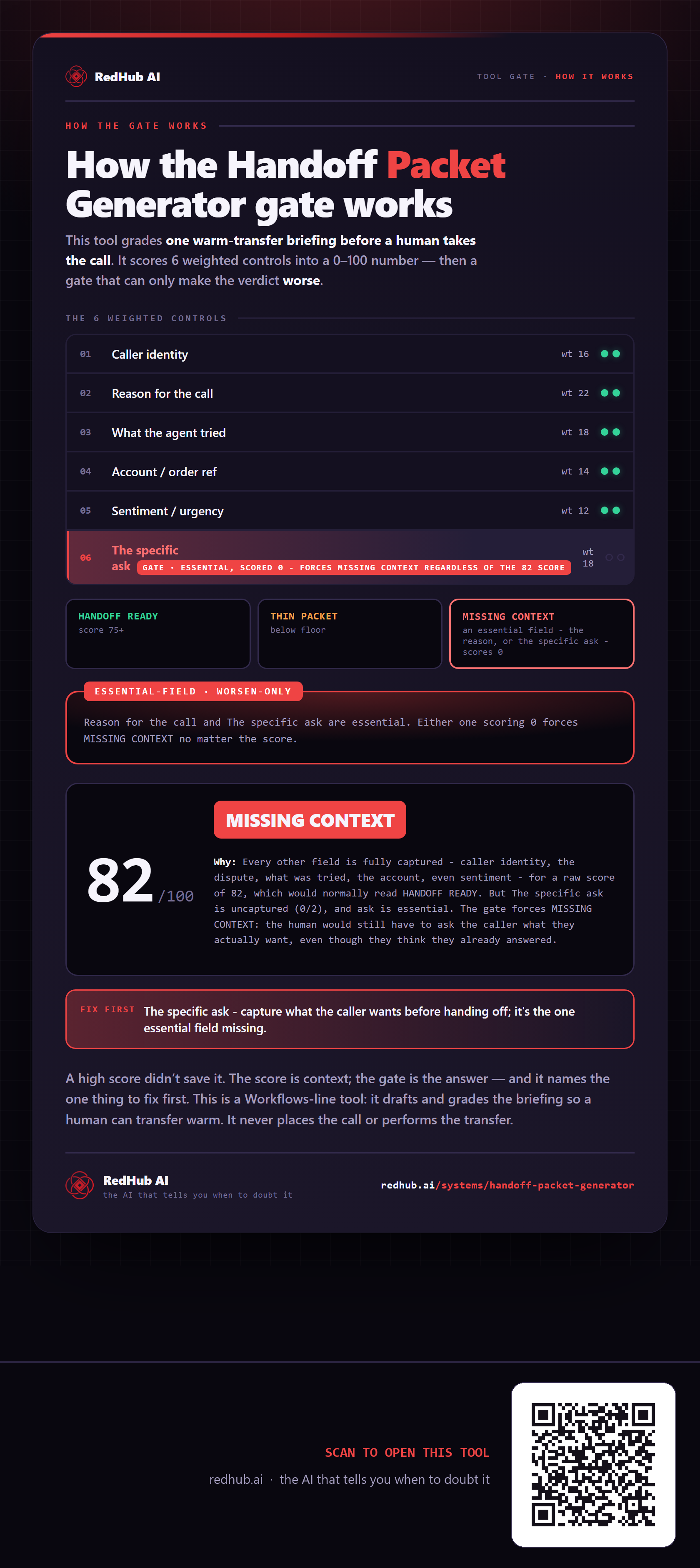
This is how Handoff Packet Generator works. More diagrams in the Visual Field Guide.