Tool Gate · How it works
How the The Browser Line Read-Off gate works
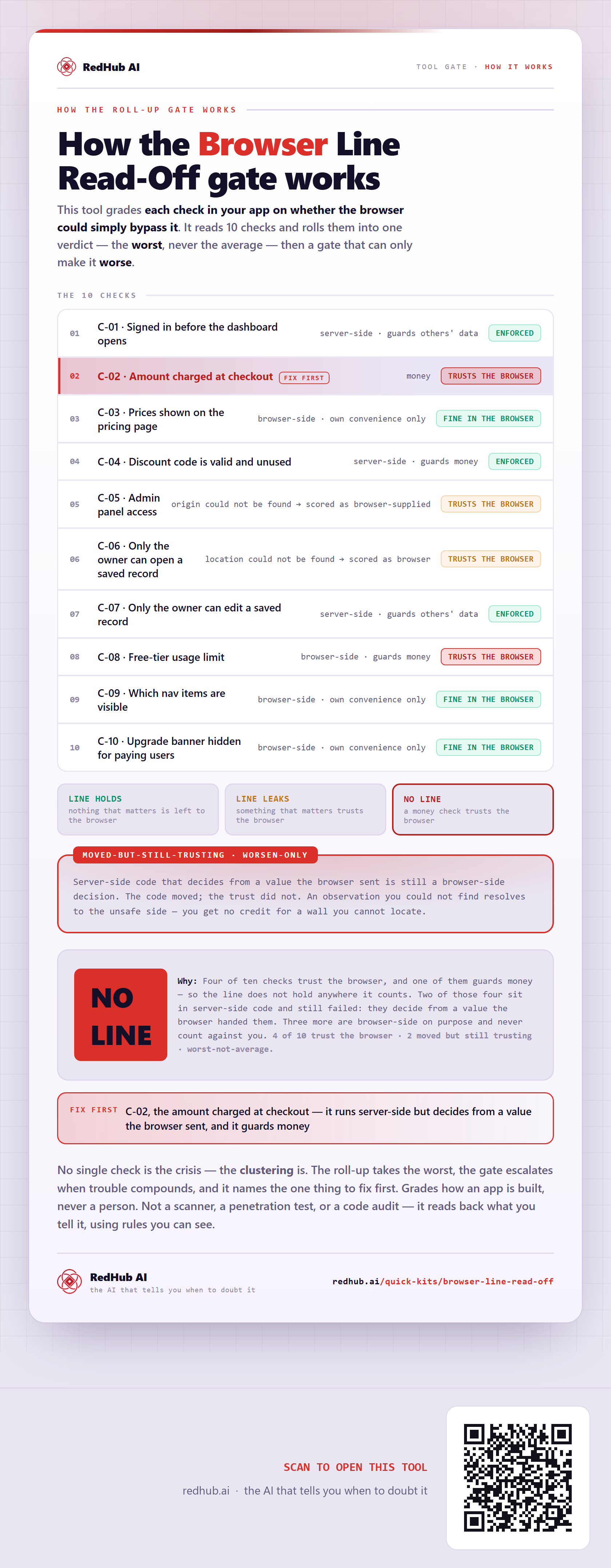
How the Browser Line Read-Off rolls ten checks into one verdict: each check resolves to enforced, trusting the browser, or fine in the browser, and a gate catches server-side code that still decides from a browser value - which is how the sample reads NO LINE.
How the gate works
This tool grades each check in your app on whether the browser could simply bypass it. It reads 10 checks and rolls them into one verdict — the worst, never the average — and then a gate that can only make it worse.
The 10 checks
| Check | Verdict |
|---|---|
| C-01 · Signed in before the dashboard opens | ENFORCEDserver-side · guards others' data |
| C-02 · Amount charged at checkoutfix first | TRUSTS THE BROWSERmoney |
| C-03 · Prices shown on the pricing page | FINE IN THE BROWSERbrowser-side · own convenience only |
| C-04 · Discount code is valid and unused | ENFORCEDserver-side · guards money |
| C-05 · Admin panel access | TRUSTS THE BROWSERorigin could not be found → scored as browser-supplied |
| C-06 · Only the owner can open a saved record | TRUSTS THE BROWSERlocation could not be found → scored as browser |
| C-07 · Only the owner can edit a saved record | ENFORCEDserver-side · guards others' data |
| C-08 · Free-tier usage limit | TRUSTS THE BROWSERbrowser-side · guards money |
| C-09 · Which nav items are visible | FINE IN THE BROWSERbrowser-side · own convenience only |
| C-10 · Upgrade banner hidden for paying users | FINE IN THE BROWSERbrowser-side · own convenience only |
The verdict bands
Server-side code that decides from a value the browser sent is still a browser-side decision. The code moved; the trust did not. An observation you could not find resolves to the unsafe side — you get no credit for a wall you cannot locate.
In the worked sample it reads NO LINE — Four of ten checks trust the browser, and one of them guards money — so the line does not hold anywhere it counts. Two of those four sit in server-side code and still failed: they decide from a value the browser handed them. Three more are browser-side on purpose and never count against you. Marked fix first on this sample: C-02, the amount charged at checkout — it runs server-side but decides from a value the browser sent, and it guards money.
Common questions
Can every check look survivable on the Browser Line Read-Off gate and the company still read NO LINE?
Yes. The roll-up takes the worst of 10 checks — never the average — then a worsen-only gate, the Moved-but-still-trusting gate, escalates when trouble clusters. In the worked sample it reads NO LINE because four of ten checks trust the browser, and one of them guards money — so the line does not hold anywhere it counts. Two of those four sit in server-side code and still failed: they decide from a value the browser handed them. Three more are browser-side on purpose and never count against you.
What is a worsen-only gate?
A rule that can only lower a verdict, never raise it. One gate-triggering gap overrides an otherwise-set of survivable lines, because a single gate-triggering gap shouldn't hide behind an average of the healthy ones. Where something is short, the fix-first row names it — here, "C-02, the amount charged at checkout — it runs server-side but decides from a value the browser sent, and it guards money".
Grades how an app is built, never a person. Not a scanner, a penetration test, or a code audit — it reads back what you tell it, using rules you can see.
Embed this diagram
Free to share and embed with attribution (CC BY 4.0) — keep the link to redhub.ai.
Interactive — renders the live diagram
<iframe src="https://redhub.ai/visuals/tool/browser-line-read-off.html" title="How the The Browser Line Read-Off gate works — RedHub AI" width="760" height="2249" loading="lazy" style="border:0;width:100%;max-width:760px"></iframe>
<p style="font:14px/1.5 system-ui,sans-serif"><a href="https://redhub.ai/visuals/tool/browser-line-read-off">How the The Browser Line Read-Off gate works</a> — by <a href="https://redhub.ai">RedHub AI</a>, the AI that tells you when to doubt it.</p>
Image + link — a static picture for any blog
<a href="https://redhub.ai/visuals/tool/browser-line-read-off"><img src="https://redhub.ai/visuals/tool/browser-line-read-off-share.png" alt="Diagram of the Browser Line Read-Off: ten checks, a moved-but-still-trusting gate, and a sample reading NO LINE with the checkout amount to fix first." width="760" loading="lazy" style="max-width:100%;height:auto;border-radius:16px"></a>
<p style="font:14px/1.5 system-ui,sans-serif"><a href="https://redhub.ai">RedHub AI</a> — the AI that tells you when to doubt it.</p>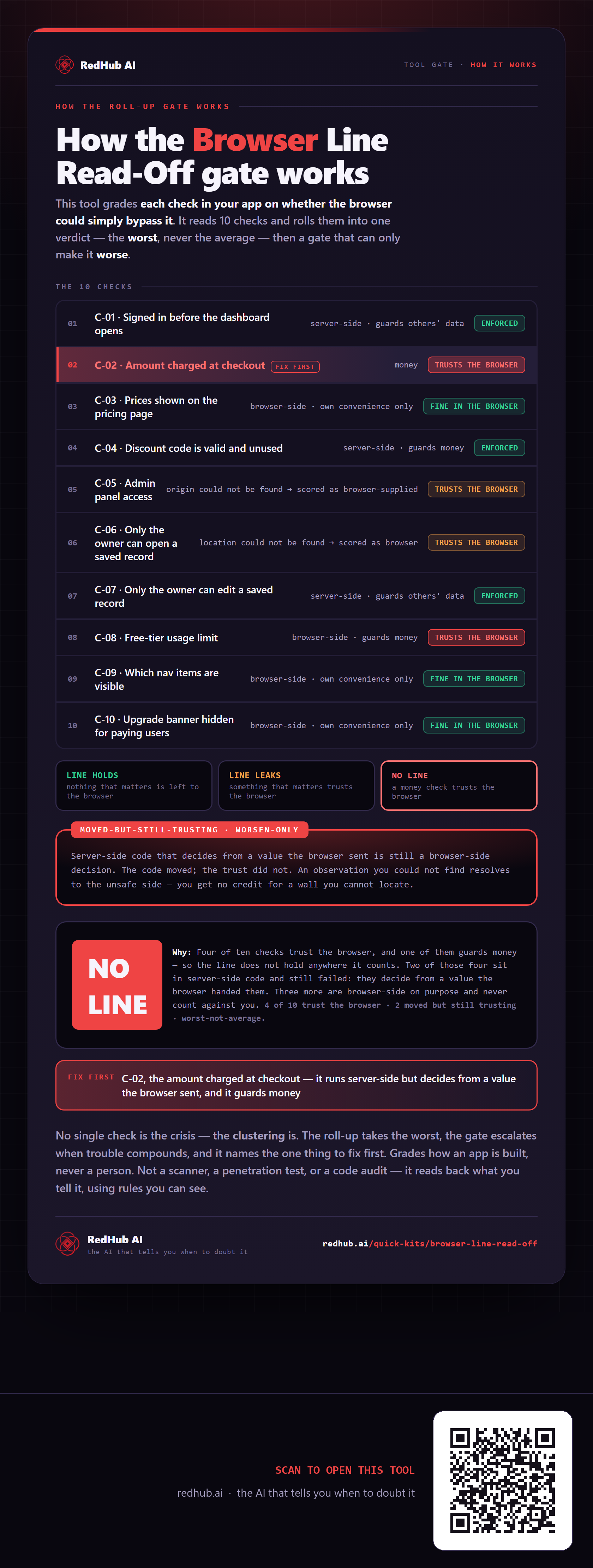
This is how Browser Line Read-Off works. More diagrams in the Visual Field Guide.