Document Intake Completeness Checker
Know whether a case has everything it needs to start — and never start one that's missing a non-negotiable. One verdict per case, against a checklist you define.
one-time · workbook + Python engine + 2 playbooks · yours to keep
The problem
“Did we get everything?” is where intake quietly breaks.
A case kicks off, then stalls two weeks in when someone notices the signed agreement was never returned.
Time spent hunting a nice-to-have while a genuine blocker sits unflagged. Not all gaps are equal.
“90% complete” feels ready — but if the missing 10% is the consent or a valid ID, it isn't ready at all.
What's inside
A checklist with teeth, in a workbook and an engine.
The standard
A blocker holds the case — completeness doesn't override it.
Every status is a fixed rule against the packet you enter — no model, no guessing. The same packet always returns the same verdict.
Mark the non-negotiables — a signed agreement, a consent, a valid ID. If one is missing, expired, or invalid, the case is HOLD INTAKE no matter how complete the rest is.
CHASE means missing paperwork you can chase while you start. HOLD INTAKE means a hard stop. Telling them apart is the point.
How it works
Try it — renew an expired ID, or clear a chase, and watch the verdict move.
Held: a blocker item (Government photo ID (non-expired)) is expired. 83% complete doesn't override a missing non-negotiable.
1 complete · 1 chasing · 1 held. A blocker holds a case no matter its completeness.
CHASE = missing paperwork, safe to start. HOLD INTAKE = a non-negotiable is missing. Different actions, by design.
Intake queue (blocked): One case cleared, one to chase (missing W-9, malformed email), and one held on an expired ID — even though it's 83% complete.
Every status is a fixed check against the packet you enter — no model, no guessing. The workbook and the engine produce these exact verdicts. It checks your own packets against your own checklist; it does not score or rank people, and it is not legal advice.
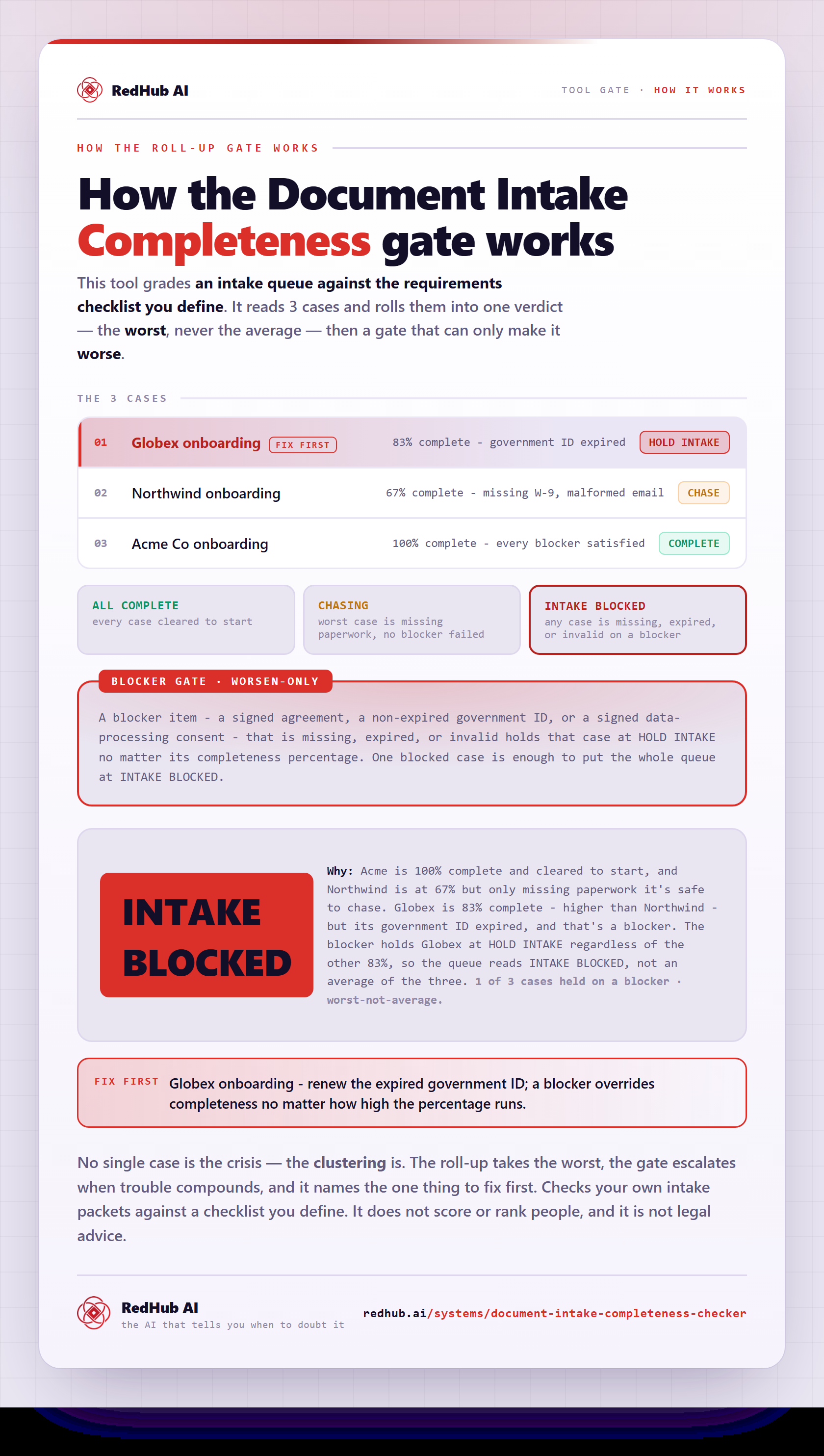
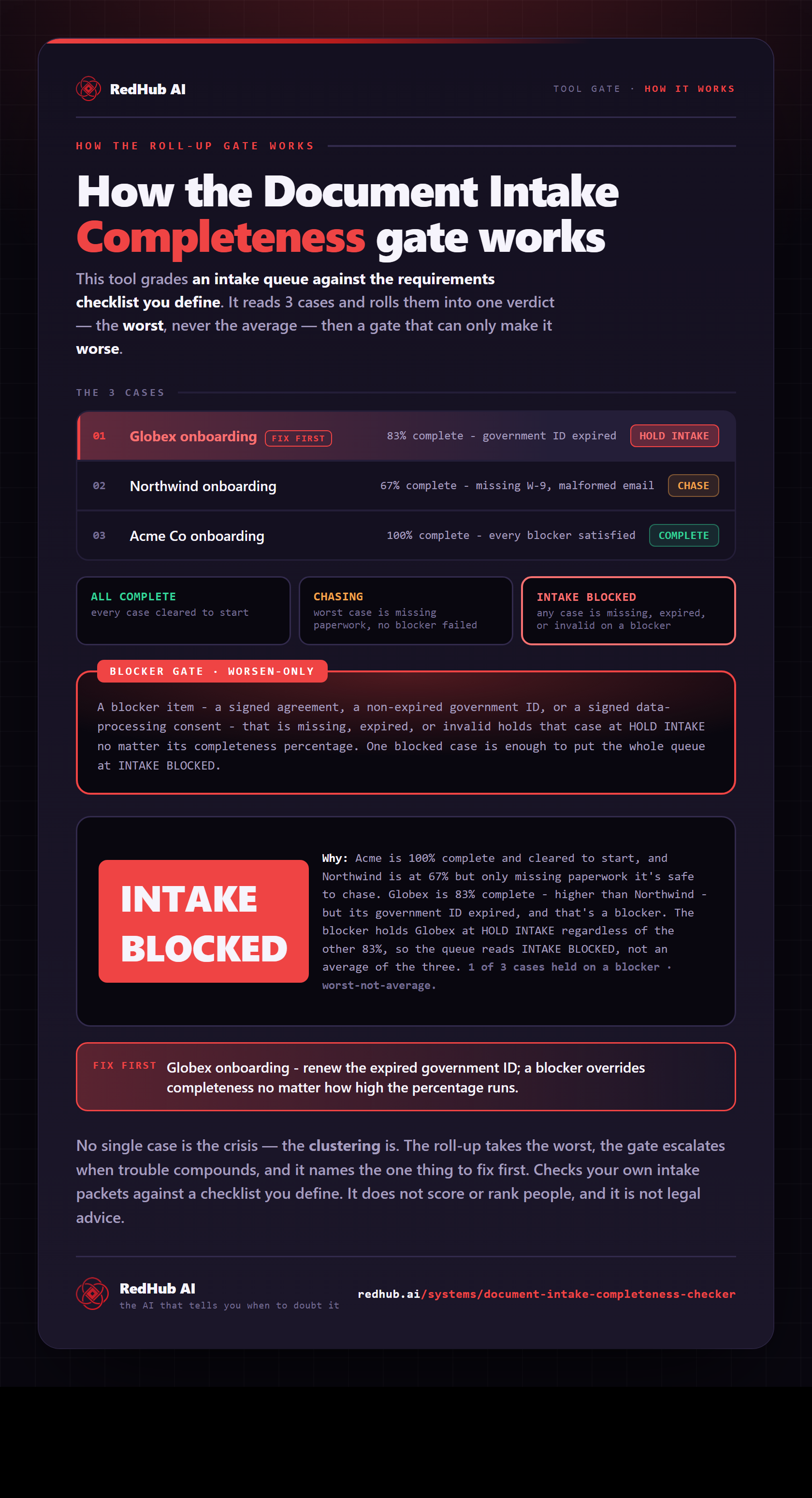
How the gate works, in one image
How the Document Intake Completeness Checker scores every case in your intake queue and holds the batch on one blocker, whatever the average — the same math the demo runs, as a diagram you can share or embed anywhere.
View & embed the full diagramThe engine
Same verdicts, from the command line.
For a whole intake queue, the included Python engine prints the per-case verdicts and the queue rollup. It produces the same results as the workbook — verified on every build.
========================================================================
  DOCUMENT INTAKE COMPLETENESS  ·  as of 2026-06-22
========================================================================
  CASE                       COMPLETE   VERDICT       FAILED ITEMS
------------------------------------------------------------------------
  Acme Co onboarding             100%   COMPLETE      —
  Northwind onboarding            67%   CHASE         contact_email, billing_w9
  Globex onboarding               83%   HOLD INTAKE   government_id  [BLOCKER]
  Initech onboarding              83%   HOLD INTAKE   signed_agreement  [BLOCKER]
  Umbrella onboarding            100%   COMPLETE      —
------------------------------------------------------------------------
  COMPLETE 2   CHASE 1   HOLD INTAKE 2
------------------------------------------------------------------------
  QUEUE: INTAKE BLOCKED
========================================================================
  Checks your own packet against your own checklist. Not legal advice.
========================================================================
Checks your own intake packets against a checklist you define. It does not score or rank people, and it is not legal advice.
Who it's for
Any team that opens cases from a packet of documents.
- Client onboarding and new-account intake
- Loan, mortgage, and lending file checks
- Vendor / supplier onboarding packets
- Any required-document intake (permits, patient packets, enrollments)
- Reading or judging a document's contents on its merits (a present document still needs a human read)
- Validating one document's internal fields (that's a field validator)
- Connecting to your CRM or drive (it's offline — you enter the packet)
- Scoring or ranking people
Pairs well with
Once a packet is complete, route each document to the right queue by its content.
When you're cleared to start, the connected workflow reads the deal and drafts the onboarding packet.
Pull the fields out of the documents this checker confirms you've received.
FAQ
Straight answers before you buy.
You define a requirements checklist for an intake type — a new-client packet, a loan file, a vendor onboarding bundle, a patient packet — marking each item required or optional, flagging the non-negotiables as blockers, and setting an acceptance rule (present, present-and-non-expired, or present-and-matches-format). For every case it gives each item a status (OK / MISSING / EXPIRED / INVALID) and the case one verdict: COMPLETE (start), CHASE (missing paperwork but safe to begin), or HOLD INTAKE (a blocker is missing — hard stop). It reads a packet you enter, not your systems, and it never scores or ranks people.
It's the honest core of the kit. You mark certain items as blockers — the non-negotiables you legally or operationally can't start without, like a signed agreement, a required consent, or a valid unexpired ID. If any blocker item is missing, expired, or invalid, the case is HOLD INTAKE regardless of the completeness percentage. A packet can be 83% complete and still held, because the missing piece is the one that must be there. A high score never overrides a missing non-negotiable.
They call for different actions, by design. CHASE means required non-blocker items are still outstanding — missing paperwork, a malformed email — but every blocker is satisfied, so it's safe to begin parallel prep while you chase the rest. HOLD INTAKE means a blocker itself is missing, expired, or invalid: a hard stop until it's resolved, because starting the case would be unsafe or non-compliant. CHASE is 'start, and keep collecting'; HOLD INTAKE is 'do not start yet.'
An item with a present-and-non-expired acceptance rule is checked against the evaluation date: if its expiry is on or before that date it's EXPIRED, otherwise OK. Because expiry is a blocker-eligible failure, an expired government ID forces HOLD INTAKE even when everything else is in — and the moment you record a renewed, future expiry, the status flips to OK and the case clears. The verdict is deterministic against the date you evaluate as of, so the same packet always reads the same way.
Different jobs, and they complement. The Client-Onboarding Runway is an MCP-connected workflow that reads a signed deal from your CRM and Google Drive, scores kickoff-readiness, and drafts the onboarding packet into your Drive — it's live-data and produces drafts. This is the opposite end: a self-contained, offline, deterministic check that works for any intake type (not just agency onboarding), takes a packet you enter, and returns only a readiness verdict — no CRM, no drafting. Run this to confirm a packet is complete and cleared, then run the Runway to actually kick the engagement off.
It ships as a workbook (Start Here, Dashboard, Intake Worksheet) plus a runnable Python engine that produce identical verdicts, with an operating guide and a checklist-design guide. It's fully offline and self-contained — it reads a packet you type into the worksheet, it doesn't connect to your CRM, drive, or any system, and it moves no files. Every status is a fixed rule against the packet and the checklist you define, so there's no model and no guessing. It does not score or rank people, and it is not legal advice.
New to the document-ops line? Run the Document Processing Pipeline Diagnostic first — it scores your workflow across six stages and, where a stage is short, routes you to the exact drop that fixes your bottleneck.
Stop starting cases that aren't ready.
Define your checklist once. Every case gets a clear verdict — and the ones missing a non-negotiable get held before work begins.
Checks your own intake packets against a checklist you define. It does not score or rank people, and it is not legal advice.