Transaction Categorization & Anomaly Gate
Screen a bank or card feed before it reaches the ledger. Categorize by your own rules, catch the rows you can't post, and get one honest go / no-go.
one-time · instant download · .xlsx · yours to keep
The problem
A net-zero feed is not a clean feed.
Exports balance, so they look ready. But one row no rule could categorize, one date typed in the wrong format, one transaction pasted twice - any of those quietly corrupts the books downstream, and a totals check won't catch it. You need the screen that runs before the ledger, not after.
See it run
The screen, live.
Live screen · edit any row
Eight transactions, six category rules. Every amount is sane and every date is in range — yet the batch is HOLD. Try giving row 6 a matching rule (e.g. an “acme” rule) and watch the gate release to REVIEW ROWS.
| # | Date | Description | Amount | Category | Score | Verdict |
|---|---|---|---|---|---|---|
| 1 | Software | 100 | CLEAN | |||
| 2 | Software | 100 | CLEAN | |||
| 3 | Travel | 100 | CLEAN | |||
| 4 | Software | 100 | CLEAN | |||
| 5 | Software | 100 | CLEAN | |||
| 6 | (uncategorized) | 50 | FLAG no category rule matched | |||
| 7 | Software | 100 | CLEAN | |||
| 8 | Software | 100 | REVIEW amount outlier in Software |
Batch verdict
HOLD
clean-rate 94 · 6 CLEAN / 1 REVIEW / 1 FLAG · fix first: row 6
Why HOLD with clean cells
A structural fault — an uncategorized row, a bad date or amount, an exact duplicate — is dispositive: it holds the whole batch no matter how high the clean-rate. An outlier or a possible duplicate only flags a row for review. Clean cells, blocked batch.
This is the live engine. The full .xlsx: paste your own feed, write your own rules, get the same gate. Start Here, Dashboard, and Transaction Screen tabs - opens in Excel, Sheets, or Numbers.
Get the kit — $49Scores a transaction file's structure and consistency, not people. It flags rows to look at; it never moves money or edits your books. Not accounting, tax, or legal advice.
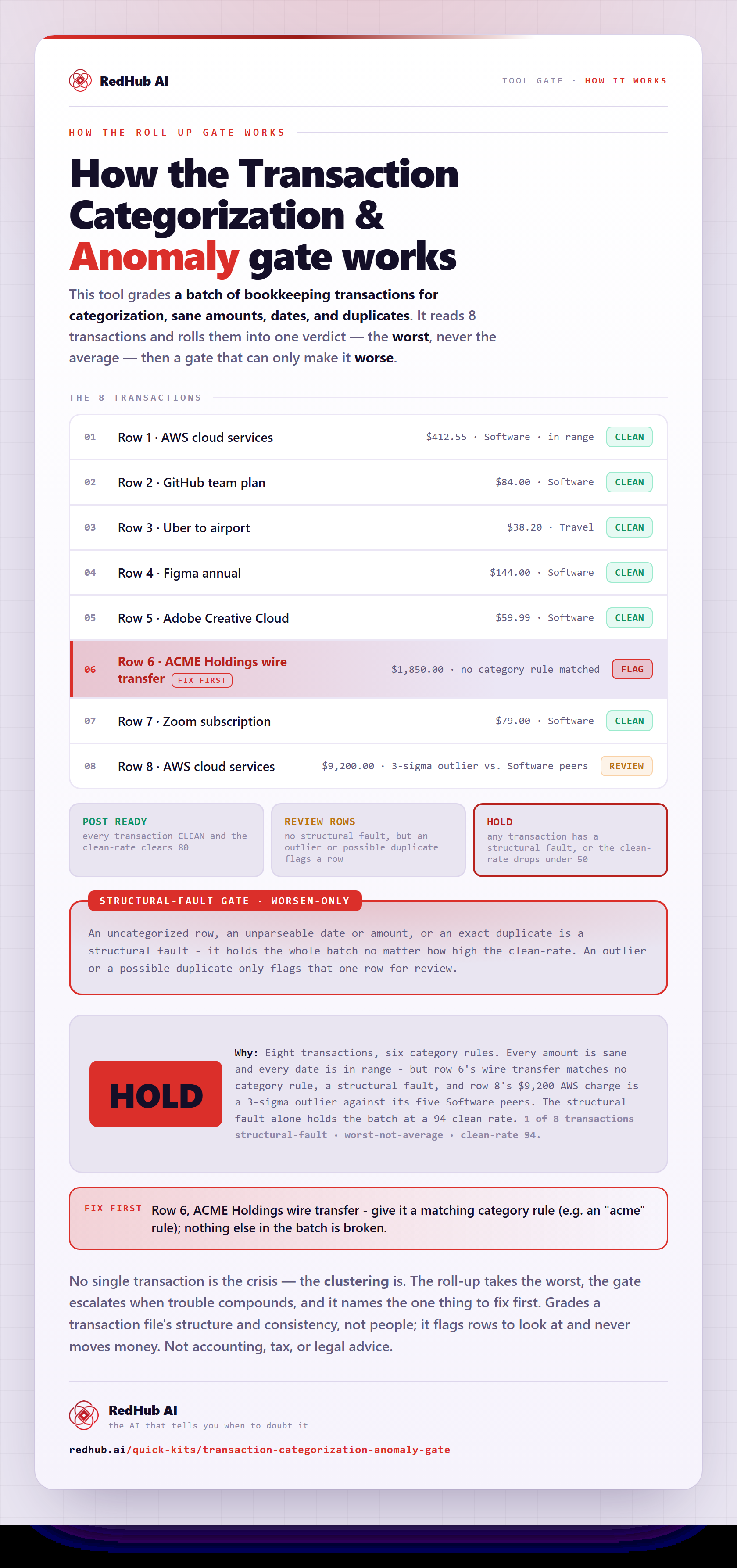
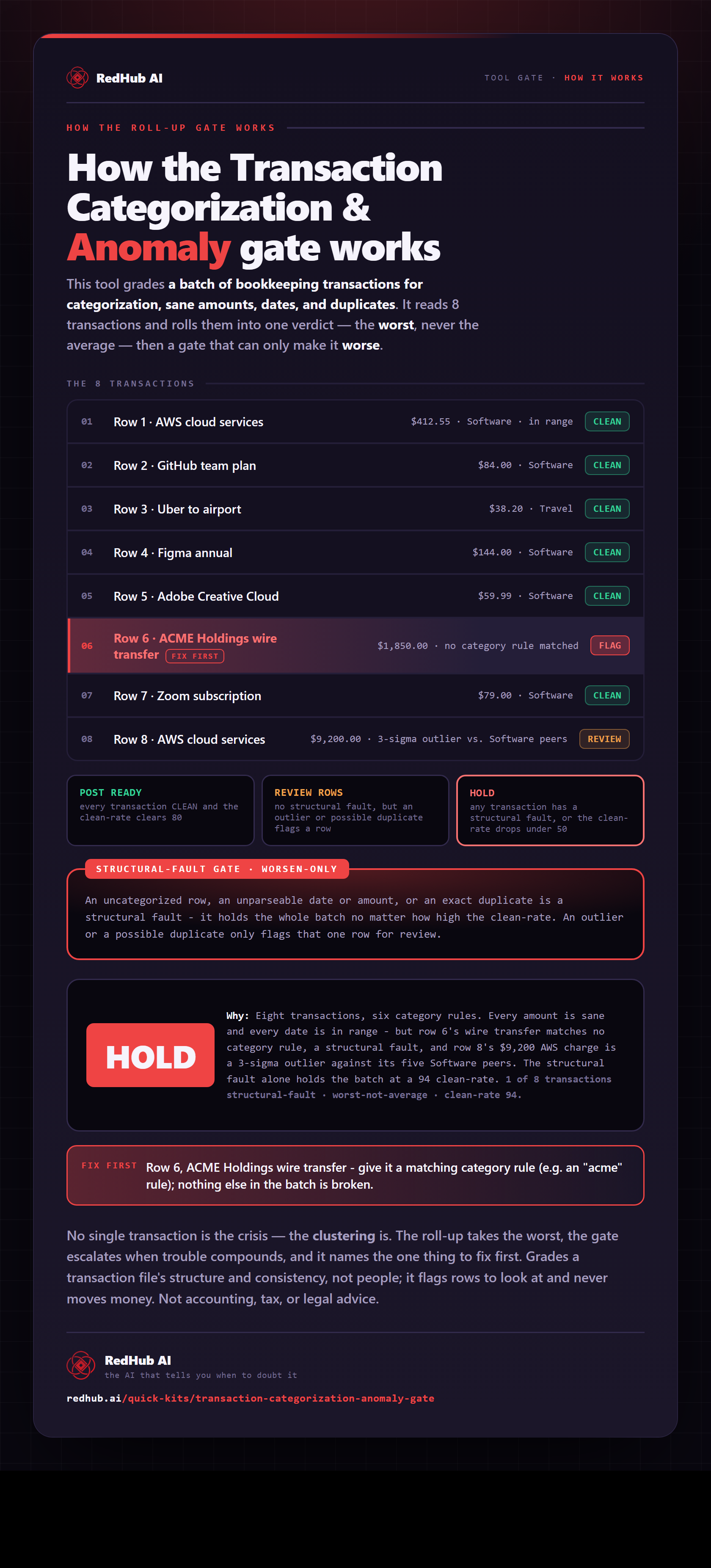
How the gate works, in one image
How the Transaction Categorization & Anomaly Gate's structural-fault gate holds a whole transaction batch on one uncategorized row — the same math the demo runs, as a diagram you can share or embed anywhere.
View & embed the full diagramThe standard
Two tiers of anomaly, one honest gate.
Structural faults are dispositive
An unparseable date, a non-numeric amount, an uncategorized row, or an exact duplicate forces HOLD - regardless of the clean-rate. The score can't outvote a row you can't post.
Graduated signals only flag
A statistical outlier amount or a possible duplicate marks a row REVIEW for a human to confirm. On its own it never blocks the batch - a real one-off purchase is fine once you check it.
Your rules, no AI guessing
Categorization is your keyword-to-category table, first match wins. Deterministic and offline; the same feed and rules give the same answer every time.
How it works
Three steps, one afternoon.
- 1Write your rules: a keyword and the category it maps to. Specific keywords go higher - first match wins.
- 2Paste your feed: date (YYYY-MM-DD), description, amount. The formula columns compute themselves.
- 3Read the Dashboard: POST READY, REVIEW ROWS, or HOLD - with, where a row is short, the row to fix first.
Who it's for
Built for the person who posts the feed.
It is
- Bookkeepers, founders, and ops people prepping a feed for the ledger
- A pre-posting screen for categorization, duplicates, and outliers
- A deterministic, offline check you can rerun any time
It isn't
- · A bookkeeping engine - it never posts an entry or moves money
- · An AI categorizer - it applies the rules you write
- · A way to score or rank people - it grades a file's structure
It flags rows to look at and points to the reason; you decide what to post and keep ownership of every number. Not accounting, tax, or legal advice.
Pairs well with
The rest of the back office.
Two-List Reconciliation Kit
$49Once a feed is clean, reconcile it against your ledger - RECONCILED / EXCEPTION / ORPHANED per row.
Finance & Reporting Automation Kit
$129A self-checking close: every tie-out labeled Ties out / Review / Does not reconcile, with one close status.
Accounts Receivable Recovery Kit
$39Work the other side of the ledger - prioritize and chase the invoices that are actually overdue.
Common questions
The questions bookkeepers actually ask before they post a feed.
Because a structural fault is dispositive and the clean-rate can't outvote it. In the worked eight-row feed every amount is sane and every date is in range, so the clean-rate is 94 — but row 6 (“ACME Holdings wire transfer”) matched none of your rules, so it's uncategorized, and you cannot post a transaction you haven't categorized. One uncategorized row forces the whole batch to HOLD regardless of the score. The clean-rate is the mean of the row scores, shown for context only — a net-zero feed is not a clean feed. Give the ACME row a matching rule and the gate releases to REVIEW ROWS (the amount outlier on row 8 flags a row but never blocks alone).
FLAG is a structural fault — dispositive. A row gets FLAG (and holds the batch) when it has an unparseable date, a non-numeric amount, no matching category rule, or is an exact duplicate of an earlier row. These are rows you genuinely cannot post as-is. REVIEW is a graduated signal — informational. A row gets REVIEW when an amount is a statistical outlier versus its own category peers (leave-one-out, more than 3 standard deviations, with at least three peers), it's a possible near-duplicate, or its date is outside the window. A REVIEW row is usually fine once a human confirms it — a real one-off large purchase, say — so it never blocks the batch on its own.
No AI. You write a keyword-to-category table — for example “aws → Software”, “uber → Travel” — and the kit applies it deterministically: the first rule whose keyword appears in the description wins, so put specific keywords above general ones. A row no rule matches is left uncategorized and FLAGGED, by design — the kit would rather hold a row it can't classify than guess. The same feed and the same rules always produce the same result, which is what makes it safe to rerun and defensible at close. Nothing is uploaded and no model is called.
Each row scores 0–100 on four weighted levers: categorized (50), amount is numeric (25), date is in range (15), and not a duplicate (10). A row is CLEAN at 80 or above with no fault, REVIEW on any graduated signal (or a score below 80), and FLAG on any structural fault. The batch is HOLD if any row is a structural failure or the clean-rate falls below 50, POST READY if every row is CLEAN and the clean-rate is at least 80, and REVIEW ROWS otherwise. Fix-first points at the earliest structural row, or the lowest-scoring non-CLEAN row if there are none.
No. It's a pre-posting screen, not a bookkeeping engine — it never posts an entry, moves money, edits your ledger, or writes back anywhere. It reads the feed you paste (date, description, amount) against the rules you write, scores each row, and tells you which rows you can't post yet and why, plus, where a row is short, the row to fix first. You decide what to post and keep ownership of every number. The whole thing is one deterministic .xlsx with Start Here, Dashboard, and Transaction Screen tabs — it opens in Excel, Google Sheets, or Numbers, runs offline, and never uploads anything.
No. It screens a transaction file's structure and consistency before you post it — it asserts nothing about whether a categorization is correct for tax or accounting purposes, and it never scores or ranks people. Confirm any treatment that matters with your bookkeeper, accountant, or tax advisor. It pairs with the Two-List Reconciliation Kit (reconcile the clean feed against your ledger), the Finance & Reporting Automation Kit (a self-checking close), and the Accounts Receivable Recovery Kit (work the other side of the ledger).
Get the kit
Screen the feed before you post it.
- One .xlsx, three tabs, a worked example
- Your rules, your feed, the same gate every time
- No AI, no internet, nothing uploaded
Sold by RedHub AI LLC · Secured by Stripe · redhub.ai