Two-List Reconciliation Kit
Match two lists that should agree — and see exactly what reconciles, what disagrees, and what's on only one side.
instant download · .xlsx · yours to keep
The problem
Two lists that should match never quite do — and finding the gaps by eye is slow and error-prone.
Scrolling two sheets side by side, hunting for the row that's in one and not the other. Easy to miss, hard to trust.
A one-cent difference flagged as a mismatch buries the real discrepancies in false positives.
Calling it reconciled when a few rows are still unmatched — the gap you didn't chase is the one that bites at month-end.
What's inside
A key-based join, a tolerance, and a verdict — in one spreadsheet.
The standard
One unmatched row blocks “reconciled.”
Every outcome is a fixed comparison of the two lists you paste in — no model, no invented matches. The same lists always return the same verdict.
You set how close two amounts must be to agree. The default absorbs a one-cent rounding difference; a difference at the tolerance still reconciles.
Reconciled only when every key agrees. Orphans on both sides at once escalate to ORPHANED — the signal that the lists don't even align.
How it works
Try it — reconcile the exceptions, or break the file with a both-sided orphan.
| Key | A amt | B amt | A status | B status | Outcome |
|---|---|---|---|---|---|
| INV-1001 | 1,200.00 | 1,200.00 | cleared | cleared | RECONCILED |
| INV-1002 | 845.12 | 845.12 | cleared | cleared | RECONCILED |
| INV-1003 | 500.00 | 545.00 | cleared | cleared | EXCEPTION(amount) |
| INV-1004 | 320.00 | 320.00 | cleared | pending | EXCEPTION(status) |
| INV-1005 | 90.00 | — | cleared | — | ORPHAN A |
| INV-1007 | 1,500.00 | 1,500.00 | cleared | cleared | RECONCILED |
3 reconciled · 2 exceptions · 1 orphan A · 0 orphan B. A single unmatched or disagreeing row blocks RECONCILED.
of 6 distinct keys. Context only — the verdict is the gate, not the percentage.
Bank vs ledger: Two rows reconcile (one within the rounding tolerance), one amount and one status disagree (EXCEPTION), and one row is on the bank only (ORPHAN A). One disagreeing or unmatched row blocks RECONCILED — the batch is EXCEPTIONS.
This is the live engine. The .xlsx reconciles your own two lists — paste List A and List B, set the tolerance, read every key's outcome. Same deterministic logic as this demo: RECONCILED / EXCEPTION / ORPHANED, with a gate that won't call two lists reconciled while any row is unaccounted for.
Get the kit — $49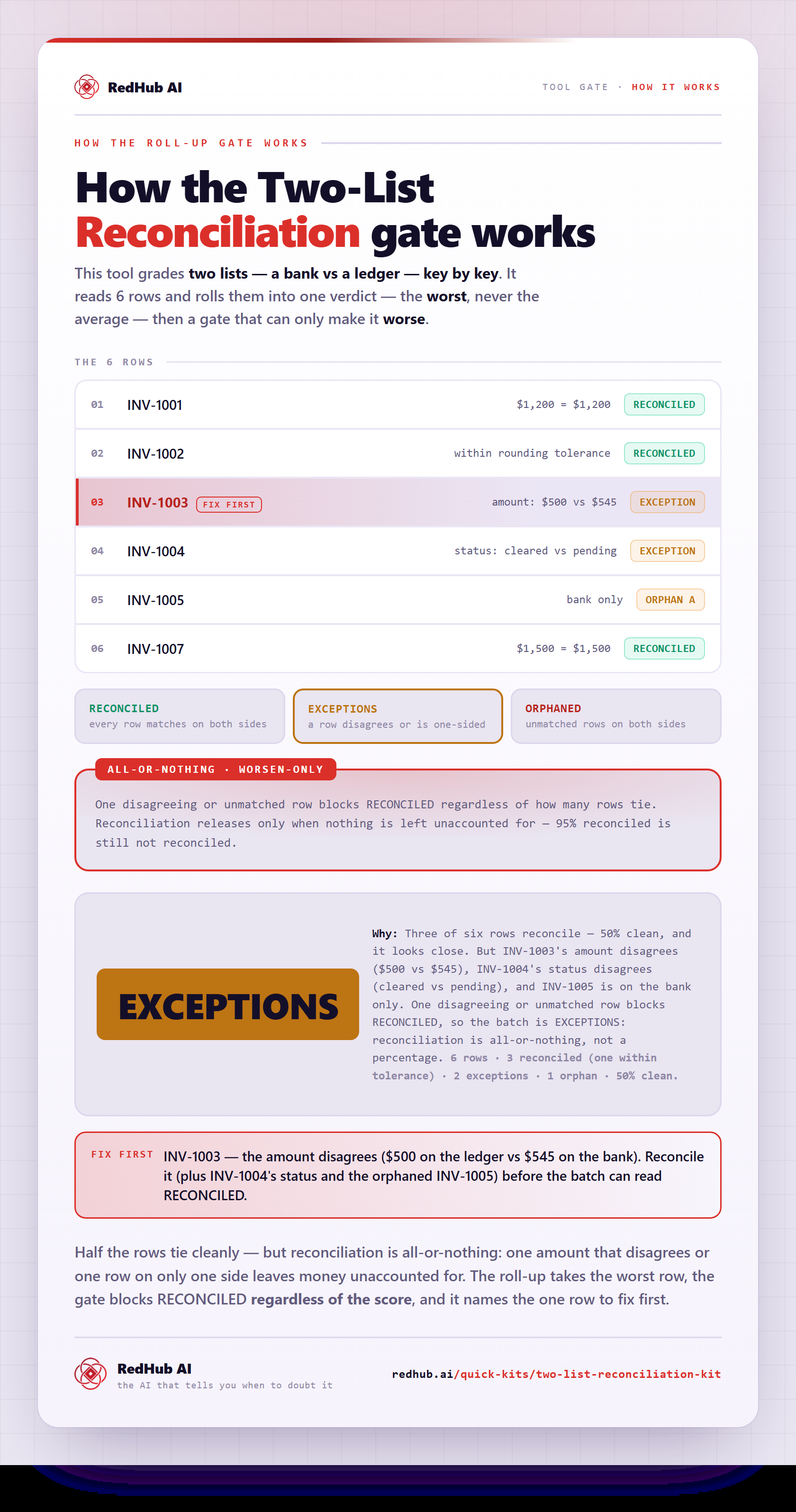
How the gate works, in one image
Each row rolled up to the worst and the all-or-nothing gate that blocks RECONCILED on a single mismatch — 50% clean still reads EXCEPTIONS. The same math the demo runs, as a diagram you can share or embed anywhere.
View & embed the full diagramWhat you'll see
Every key, classified — and one verdict for the pair.
On both lists and every compare field agrees within tolerance. Fully accounted for.
On both lists but a value disagrees — an amount beyond tolerance or a differing status. Investigate.
On only one list — ORPHAN A (in A, missing from B) or ORPHAN B (the reverse).
Who it's for
Anyone holding two lists that should describe the same set of things.
- Bank statement vs ledger / books
- A vendor's invoice list vs your PO log
- Payroll register vs the time system
- A shipment manifest vs what was received
- Any two exports that share a key
- Accounts-payable three-way match with domain rules (that's a dedicated System)
- Checking one source's figures against itself (a close workbook)
- Fuzzy / approximate name matching — it joins on an exact key
- Scoring or ranking people
FAQ
Straight answers before you buy.
It reconciles two lists that should describe the same set of things — a bank statement vs your ledger, a vendor's invoice list vs your PO log, a payroll register vs the time system, a shipment manifest vs what was received. You paste List A and List B, pick a match key (an ID, invoice number, or email) and an amount tolerance, and it joins the two lists on that key and classifies every distinct key as RECONCILED, EXCEPTION, or ORPHANED. It's one .xlsx with three tabs — Start Here, Dashboard, Reconciliation — and a worked bank-vs-ledger example ready to overwrite. It reads only the two lists you paste; it never touches your accounts or systems.
An EXCEPTION is a key that's on both lists but a compare value disagrees — an amount that differs beyond the tolerance, or a status that doesn't match. The record exists on both sides; the values don't line up, which usually means a posting or pricing error. An ORPHAN is a key that's on only one list: ORPHAN A is in List A and missing from B, ORPHAN B is the reverse — a record one side has and the other never saw. They're genuinely different problems, which is why a plain matched/unmatched count hides the more useful signal: a row that matches the key but disagrees on the money is not the same as a row that's simply absent.
The batch verdict is a gate, not a percentage. The pair is RECONCILED only when every key reconciles — a single exception or a single orphan blocks it, because you cannot honestly call two lists reconciled while any row is unaccounted for. If orphans show up on both sides at once, the batch escalates past EXCEPTIONS to ORPHANED — the signal that the two lists don't even align (usually a key-format mismatch or the wrong file, not a few stragglers). The reconciled share is shown for context only; the verdict keys off the gate, never the number. A net difference of zero is not a reconciliation: two offsetting errors plus a missing record can net to exactly zero and still hide three real problems.
You set how close two amounts must be to count as agreeing. The default is 0.01, which absorbs a one-cent rounding difference so a trivial gap isn't flagged as a false mismatch — 845.124 and 845.12 reconcile, while 500.00 and 545.00 are an exception. Set the tolerance to 0 to require exact equality. A difference exactly at the tolerance still reconciles: the comparison uses a relative epsilon, not an exact equality test, so float representation never tips a boundary case the wrong way.
No. The Invoice–PO–Receipt 3-Way Match (TWM) is a three-way match with accounts-payable semantics — price, quantity, and receipt, with a payment-block gate. This kit is the general two-way reconcile: it joins any two lists on a key and a couple of compare fields, for any pair of lists, not just AP. It's also not a close workbook like the Finance & Reporting Automation Kit, which checks a single source's own tie-outs against the books' math. This kit joins two independent external lists and classifies each key. Different unit, different mechanism.
Keys are matched exactly, after trimming surrounding spaces and lowercasing — so 'INV-1001' and ' inv-1001 ' are treated as the same key, but it does not do fuzzy or approximate matching. If your two lists key on slightly different formats (leading zeros, prefixes, punctuation), normalize the key column before pasting so the join lands. It joins on an exact, normalized key by design: that's what makes every outcome deterministic and repeatable — the same two lists always return the same verdicts, with no model and no invented matches.
New to the document-ops line? Run the Document Processing Pipeline Diagnostic first — it scores your workflow across six stages and, where a stage is short, routes you to the exact drop that fixes your bottleneck.
Get the kit
Reconcile two lists in an afternoon.
- Paste two lists, set a key and a tolerance
- Every row classified, one verdict for the pair
- A worked bank-vs-ledger example, ready to overwrite
Reconciles your own two lists against each other. It does not score or rank people, and it is not accounting or legal advice.