Reporting that checksits own math.
Most reporting errors aren’t fraud — they’re a number that quietly stopped tying out. A sub-ledger drifts from the GL, cash is off by a little, a variance blows past plan, and in a manual close you find out late, or after the report is already out.
This kit catches them before they reach a report. A workbook that runs every tie-out and labels each Ties out, Review, or Does not reconcile — you enter the figures, it tells you what doesn’t reconcile.
A number quietly stops tying out.
The scariest line in a monthly close isn’t a big variance — it’s a sub-ledger that quietly drifted from the GL and nobody caught. A small cash difference. A payable that doesn’t match the aging. In a manual close, these surface late, or not until the report is already out.
The fix is a checking layer that runs every tie-out automatically and tells you, in plain terms, what needs attention — before it reaches a report, not after.
Within tolerance — no action needed. The check confirms the numbers agree to the dollar threshold you set.
A small difference inside the review threshold — worth a look before sign-off, but not necessarily an error.
Beyond threshold — resolve the cause before reporting. This is the line that quietly drifted, caught early.
Adjust a figure. Watch a check flip.
Change a few numbers and watch the checks decide what ties out and what doesn’t — the exact verdict logic the workbook runs ($1 ties out, $100 review, 5% variance). The full workbook checks far more. (Illustrative tolerances; set your own materiality. Not accounting advice.)
| Check | Left | Right | Diff | Verdict |
|---|---|---|---|---|
| Balance sheet (A = L + E) | 500,000 | 500,000 | 0 | Ties out |
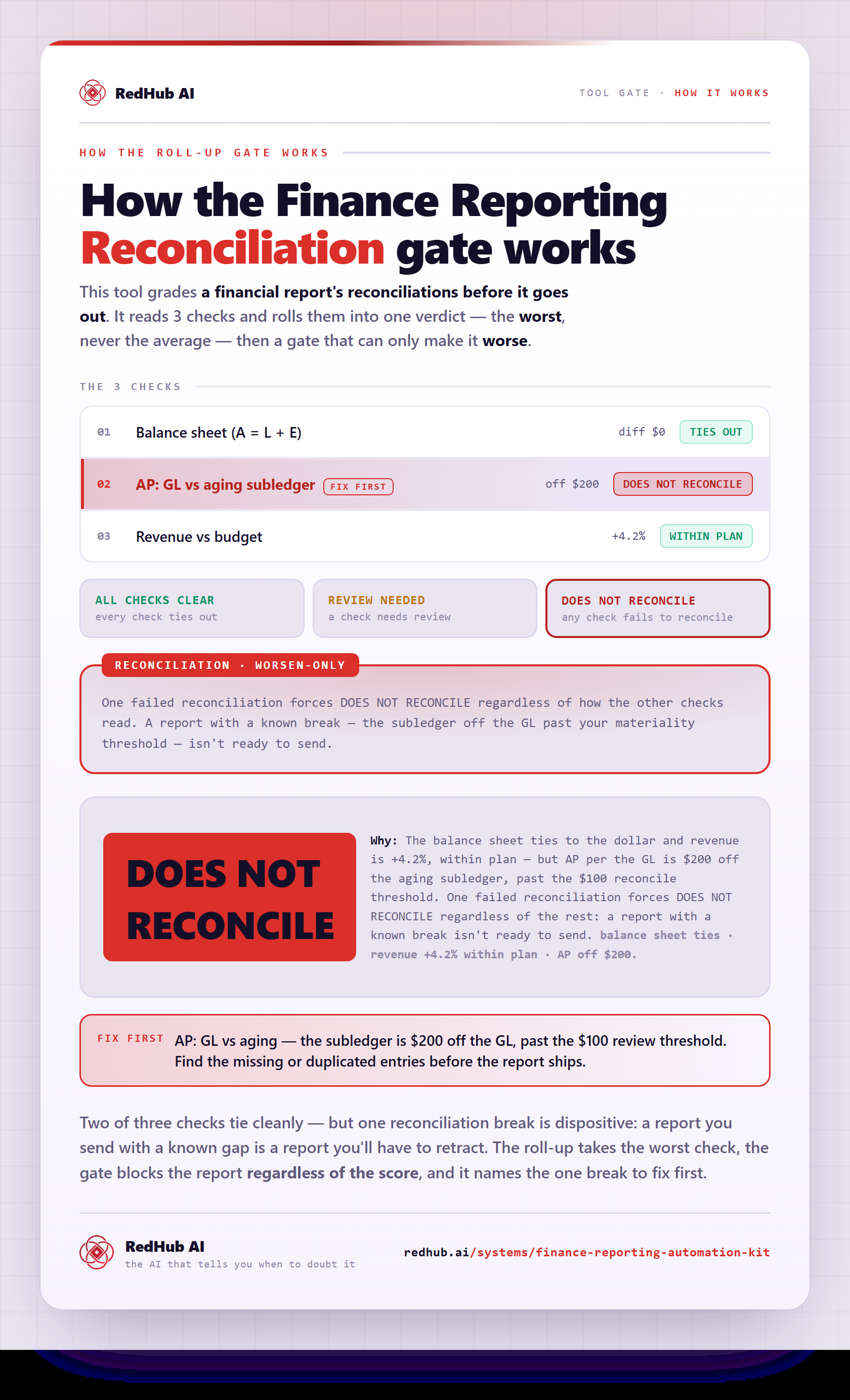
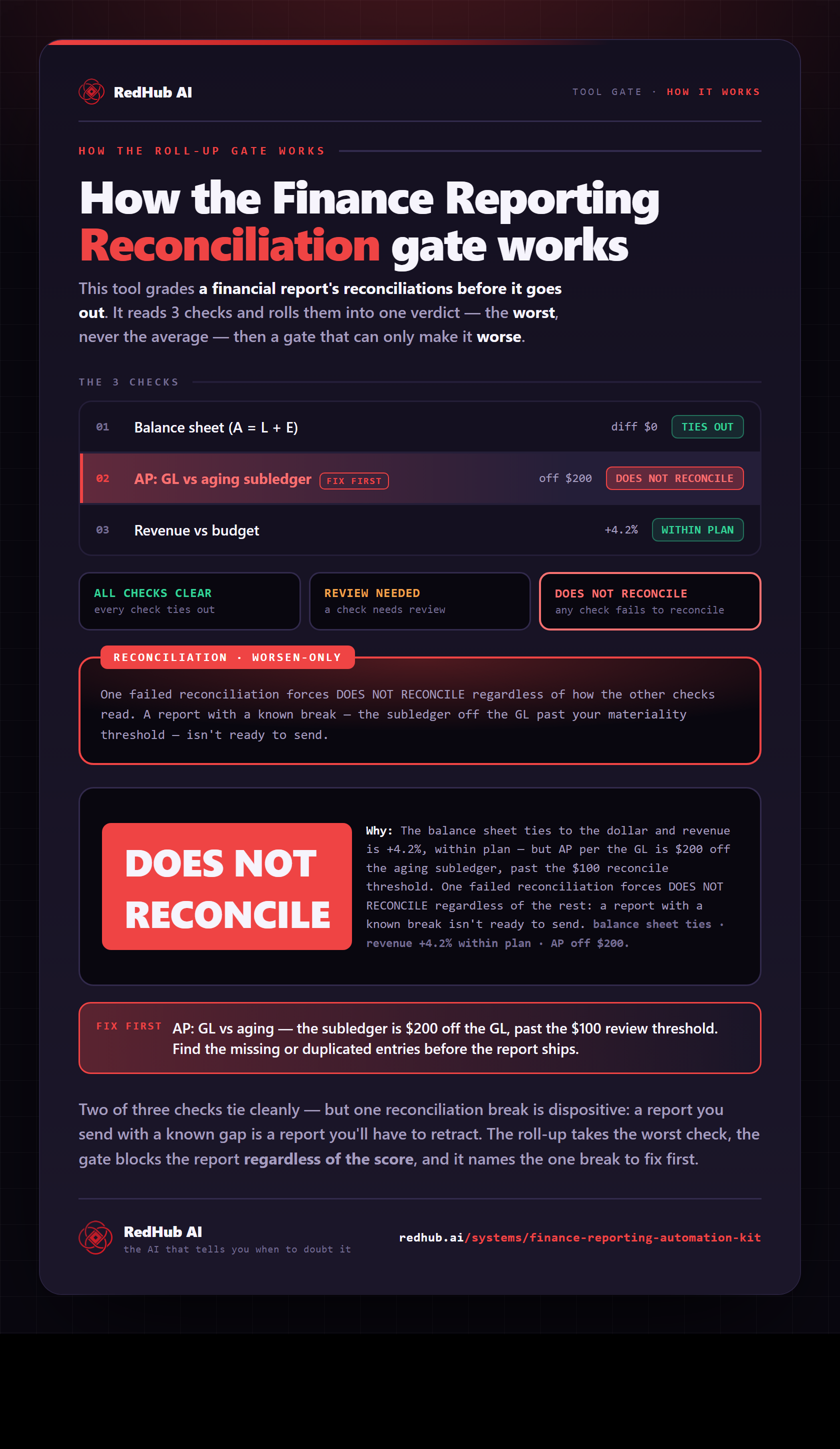
| AP: GL vs aging | 45,000 | 45,200 | -200 | Does not reconcile |
| Revenue vs budget | 240,000 | 250,000 | 4.2% | Within plan |
Overall: DOES NOT RECONCILE
Don't publish while anything says Does not reconcile — fix the cause first.
The full workbook checks much more.
AR/AP vs GL, cash vs bank, income-statement consistency, and opex variance — color-coded, with one overall close status and a close SOP.
Get the Finance & Reporting Automation Kit — $129Tolerances here are illustrative ($1 ties out, $100 review, 5% variance). Set your own materiality in the workbook. Not accounting advice.
How the gate works, in one image
Each reconciliation rolled up to the worst and the gate that blocks the report on one break — a tied balance sheet and on-plan revenue don't ship it when AP is $200 off the subledger. The same math the demo runs, as a diagram you can share or embed anywhere.
View & embed the full diagramEvery tie-out that should agree — does.
The workbook runs these reconciliations automatically, each against the tolerance you set, and rolls them into one overall close status.
A workbook, a close SOP, and prompts.
Enter the period's figures; reconciliations run automatically — balance sheet, AR/AP vs GL, cash vs bank, income statement, and budget variance — each labeled Ties out, Review, or Does not reconcile, with one overall status. Ships with worked example numbers.
The monthly close rhythm, what each verdict means, a close checklist, and review and sign-off practices — so the workbook sits inside a repeatable process.
Draft commentary, explain variances, summarize a P&L, and QA a report — without fabricating numbers. You give the model reconciled figures; it explains, never invents.
Four steps, every close.
Type or paste the month's numbers into the Inputs tab. Nothing connects to your accounting system — you stay in control of the data.
Define what 'ties out' means for you: the dollar threshold, the review band, and the variance percentage. Materiality is yours to set.
The Checks tab runs every tie-out and labels each Ties out, Review, or Does not reconcile; the Dashboard rolls them into one overall close status.
Fix the cause of anything that doesn't reconcile — never change a figure just to clear a check — then use the prompt pack to draft honest commentary.
A checking layer, not your accountant.
This is a checking layer, not your accountant. It is not accounting, audit, tax, or financial advice, and it does not replace a qualified professional. You are responsible for your figures and any filings.
You enter the figures — it doesn’t connect to your accounting system, by design, so you stay in control of the numbers. Set the tolerances to your own materiality. And never change a number just to make a check pass — fix the cause. The whole point is to surface what’s wrong, not to paper over it.
Anyone who closes the books and signs off.
Bookkeepers, controllers, and fractional CFOs running a monthly close; founders and ops leads who own the numbers at an SMB; and agencies producing client reporting who want a tie-out layer they can trust before anything goes out the door.
AI Document Extraction Kit
$99The upstream half: turn invoices and receipts into structured data with an extractor that flags low-confidence fields instead of guessing. Extraction feeds clean figures in; this kit reconciles them on the way out. Same honest spine — flag what's shaky, don't pretend.
Investor-Ready Metrics Pack
$89Once the close ties out, this turns reconciled numbers into diligence-grade metrics — Burn Multiple, Rule of 40, LTV done right. Reconciliation makes the inputs trustworthy; the metrics pack makes them investor-ready.
Margin Leak Auditor
$79Another honest finance auditor — it sweeps your deal book for realized margin below floor and names the deals losing money. Same shape: you bring the figures, it flags exactly what's wrong, and it never fabricates a number.
The questions finance teams actually ask.
A kit for faster, more trustworthy monthly reporting, built around a self-checking workbook. You enter the period's figures and the workbook runs your reconciliations automatically, labeling each one Ties out, Review, or Does not reconcile, with one overall status.
The workbook's verdicts are formula-driven and color-coded. It confirms the balance sheet balances, sub-ledgers tie to the GL, cash ties to the bank, the income statement is consistent, and budget variances are within your thresholds — then tells you, in plain terms, what doesn't reconcile before it reaches a report.
No. You enter the figures (or paste them in). That's deliberate — it keeps the kit simple, tool-agnostic, and under your control. It's a checking layer on top of whatever system you use, not an integration that touches your books.
No. It's a working aid for bookkeeping and management reporting, not accounting, audit, tax, or financial advice, and it does not replace a qualified accountant. You are responsible for your figures and any filings — set the tolerances to your own materiality, and never change a number just to make a check pass; fix the cause.
Yes — the included prompt pack helps you draft commentary, explain variances, and QA a report. The one rule: never let a model invent or change a number. You give it real, reconciled figures and ask it to explain or summarize, not to produce the numbers.
A Self-Checking Reporting Workbook (Excel), a Reporting & Close SOP (Word), and a Finance Prompt Pack (Markdown). The workbook ships with example numbers — already showing a mix, including an AP gap that does not reconcile — so you can see exactly how it behaves before entering your own.
Close the books with confidence.
Catch what doesn’t reconcile before it reaches a report. A workbook that checks its own math, a close SOP, and finance prompts that never fabricate numbers. One-time $129, yours to keep.
Sold by RedHub AI LLC · Secured by Stripe · Not accounting, tax, or financial advice · redhub.ai