Tool Gate · How it works
How the AI Overview Traffic-Loss Diagnostic gate works
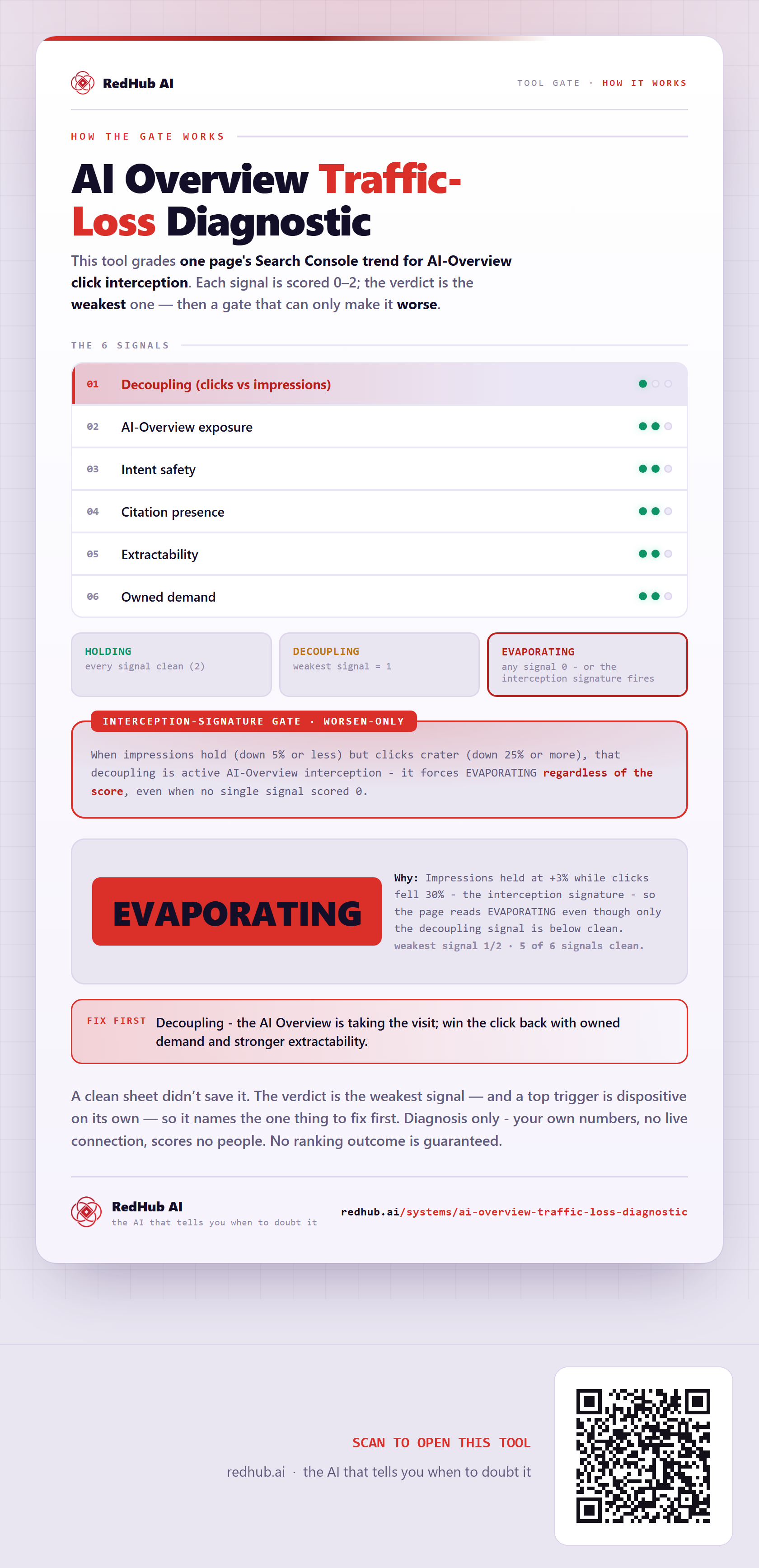
How the AI Overview Traffic-Loss Diagnostic grades a page: six signals with the verdict set by the weakest, plus an interception-signature gate where impressions holding while clicks crater forces EVAPORATING — which is how a five-of-six-clean page still fails.
How the gate works
This tool grades one page's Search Console trend for AI-Overview click interception. Each of 6 signals is scored 0–2 from your own evidence; the verdict is the weakest one — and then it is run past a gate that can only make the verdict worse.
The 6 signals
| Signal | Role |
|---|---|
| Decoupling (clicks vs impressions) | signal |
| AI-Overview exposure | signal |
| Intent safety | signal |
| Citation presence | signal |
| Extractability | signal |
| Owned demand | signal |
The verdict bands
When impressions hold (down 5% or less) but clicks crater (down 25% or more), that decoupling is active AI-Overview interception - it forces EVAPORATING regardless of the score, even when no single signal scored 0.
In the worked sample 5 of 6 signals clean (weakest 1) and it still reads EVAPORATING — Impressions held at +3% while clicks fell 30% - the interception signature - so the page reads EVAPORATING even though only the decoupling signal is below clean. Marked fix first on this sample: Decoupling - the AI Overview is taking the visit; win the click back with owned demand and stronger extractability.
Common questions
Can a profile look clean on the AI Overview Traffic-Loss Diagnostic and still fail?
Yes. The verdict is the weakest of 6 signals, then run past a worsen-only gate — the Interception-signature gate — that can only make it worse. In the worked sample 5 of 6 signals clean (weakest 1) and it still reads EVAPORATING, because impressions held at +3% while clicks fell 30% - the interception signature - so the page reads EVAPORATING even though only the decoupling signal is below clean.
What is a worsen-only gate?
A rule that can only lower a verdict, never raise it. One gate-triggering gap overrides an otherwise-clean sheet, because a single gate-triggering gap shouldn't hide behind everything that passed. Where something is short, the fix-first row names it — here, "Decoupling - the AI Overview is taking the visit; win the click back with owned demand and stronger extractability.".
Diagnosis only - your own numbers, no live connection, scores no people. No ranking outcome is guaranteed.
Embed this diagram
Free to share and embed with attribution (CC BY 4.0) — keep the link to redhub.ai.
Interactive — renders the live diagram
<iframe src="https://redhub.ai/visuals/tool/ai-overview-traffic-loss-diagnostic.html" title="How the AI Overview Traffic-Loss Diagnostic gate works — RedHub AI" width="760" height="1590" loading="lazy" style="border:0;width:100%;max-width:760px"></iframe>
<p style="font:14px/1.5 system-ui,sans-serif"><a href="https://redhub.ai/visuals/tool/ai-overview-traffic-loss-diagnostic">How the AI Overview Traffic-Loss Diagnostic gate works</a> — by <a href="https://redhub.ai">RedHub AI</a>, the AI that tells you when to doubt it.</p>
Image + link — a static picture for any blog
<a href="https://redhub.ai/visuals/tool/ai-overview-traffic-loss-diagnostic"><img src="https://redhub.ai/visuals/tool/ai-overview-traffic-loss-diagnostic-share.png" alt="Diagram of the AI Overview Traffic-Loss Diagnostic: six signals, an interception-signature gate, and a sample reading EVAPORATING with five of six signals clean." width="760" loading="lazy" style="max-width:100%;height:auto;border-radius:16px"></a>
<p style="font:14px/1.5 system-ui,sans-serif"><a href="https://redhub.ai">RedHub AI</a> — the AI that tells you when to doubt it.</p>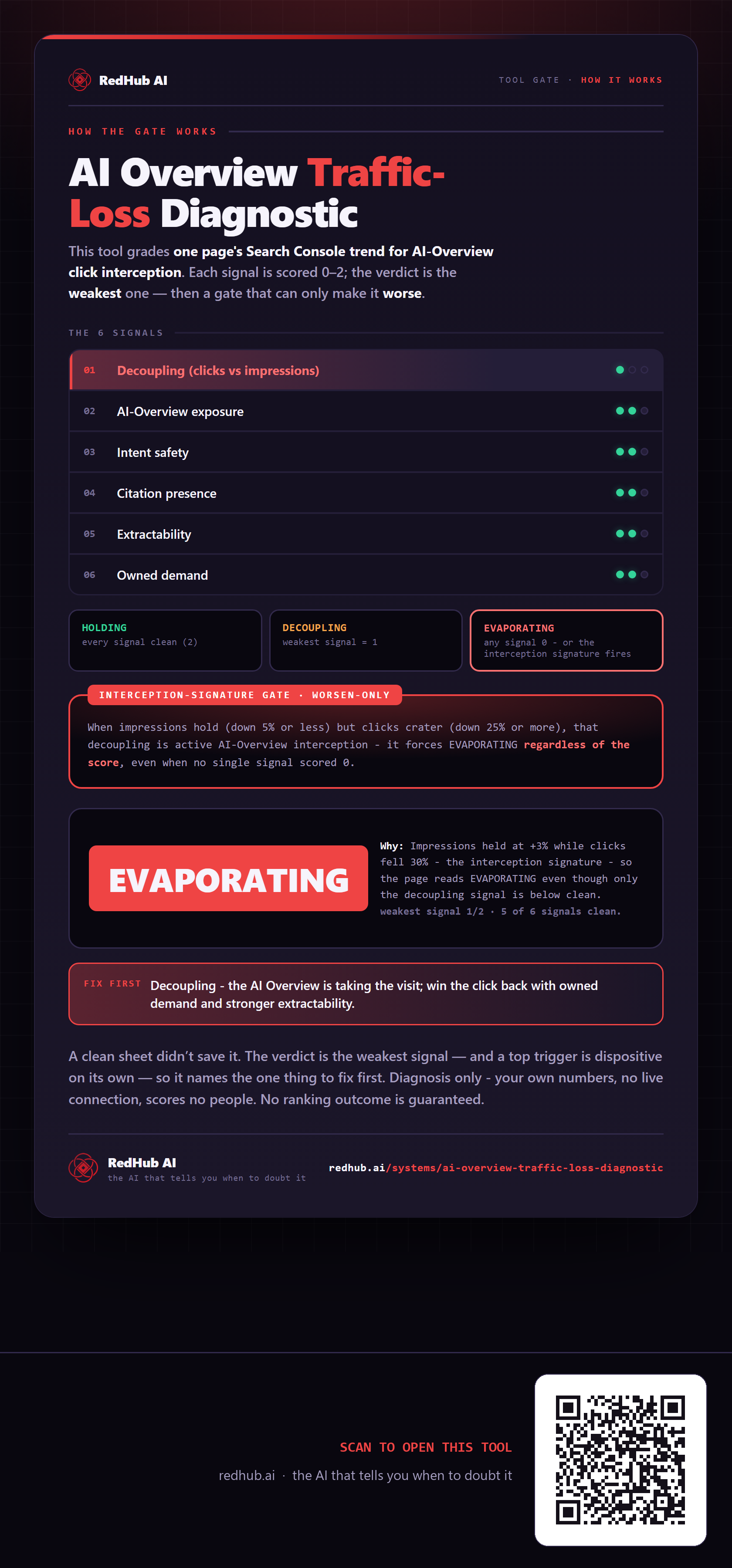
This is how AI Overview Traffic-Loss Diagnostic works. More diagrams in the Visual Field Guide.