You approved the prompt.Is that what’s actually running?
Prompts get edited straight in the platform console — a quick fix, a reworded line, a guardrail quietly dropped — and your repo never hears about it. This vault registers the versions you approved and hashes what’s live in each agent, so you can see at a glance which ones drifted, and which are running a prompt nobody signed off on.
The guardrails you certified can vanish in production.
Strip a guardrail in the console. Watch the vault flag the shadow.
front-desk-B is the quieter failure: it’s pinned to v1.1 but actually running v1.0 — a real approved version, just not the one it’s supposed to be on. That’s DRIFTED, not a shadow, and the vault names exactly which version it landed on.
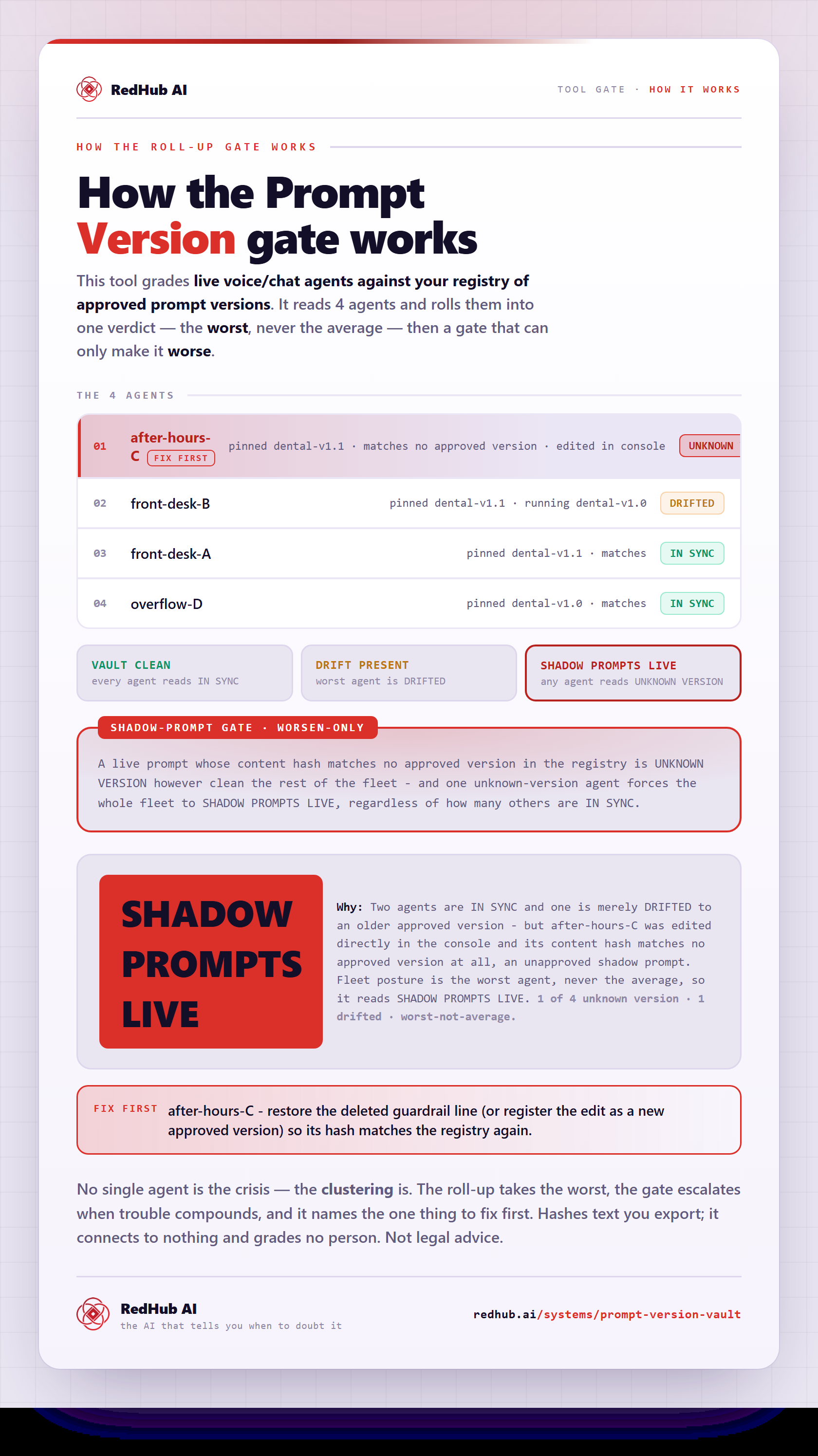
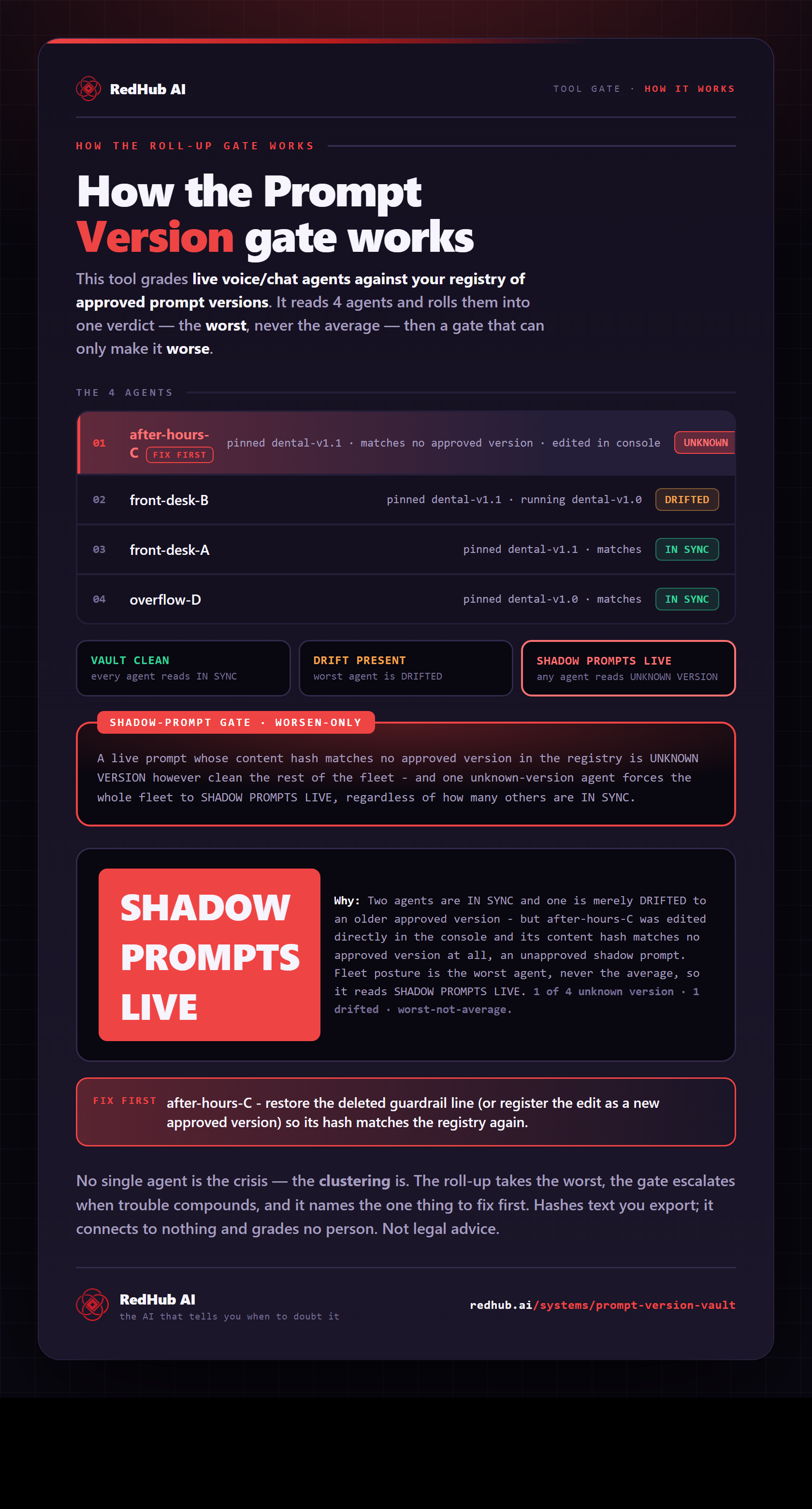
How the gate works, in one image
How the Prompt Version Vault hashes each live agent's prompt against your approved versions and flags any shadow prompt in production — the same math the demo runs, as a diagram you can share or embed anywhere.
View & embed the full diagramRegister once. Scan your live fleet against it any time.
A zero-dependency Python tool registers your approved prompts and scans a live export against them by content hash. Here is its actual scan output on the shipped four-agent sample — two in sync, one drifted, one shadow:
PROMPT VERSION VAULT - DRIFT SCAN
====================================================

PER-AGENT (live prompt vs registry)
----------------------------------------------------
front-desk-A       IN SYNC          matches pinned dental-v1.1
    live hash 1265c78451fb
front-desk-B       DRIFTED          pinned dental-v1.1, running dental-v1.0
    live hash f19c9463c92c
after-hours-C      UNKNOWN VERSION  matches no approved version
    live hash 1865eb8f2e16
overflow-D         IN SYNC          matches pinned dental-v1.0
    live hash f19c9463c92c

ROLLUP
----------------------------------------------------
Agents scanned ........... 4
In sync .................. 2
Drifted .................. 1
Unknown version .......... 1
Fix first ................ after-hours-C

VERDICT: SHADOW PROMPTS LIVE

Hashes text you export; it connects to nothing and grades no person.
Not legal advice.Three things the vault holds your fleet to.
Approved isn’t the same as running
You can approve a prompt, ship it, and still have someone tweak it in the platform console a week later. Your repo says one thing; production says another. Only comparing the live prompt to your registry reveals the gap.
A shadow prompt is the worst case
A live prompt that matches no approved version was edited outside your process — the safety blocks you certified may be gone, and no one signed off. One shadow prompt forces the whole fleet to SHADOW PROMPTS LIVE.
Cosmetic changes aren’t drift
The vault normalizes trailing spaces, blank-line runs, and indentation before hashing, so a reformatted prompt reads IN SYNC. A real wording change reads as drift. You get signal, not formatting noise.
A provenance check. Not an eval framework, not a text differ.
- A registry of your approved prompt versions, by content hash.
- A drift scanner: live vs approved, per agent.
- Shadow-prompt aware — it catches the unapproved console edit.
- Offline — it hashes an export you provide and connects to nothing.
- An eval framework or a versioning war-room — that’s the Prompt Eval System.
- A prompt-text diff — that’s the Prompt Regression Lab.
- A live platform connection — it scans what you export.
- A judge of people — it hashes text, grades no one.
Scope note. The vault hashes prompt text you export and compares it to a registry you build; it connects to no platform, changes no agent, and grades no person. A match confirms the text is identical to an approved version — it is not a review of whether that version is correct or compliant. Not legal advice.
Anyone accountable for what a fleet of agents actually says.
The governance layer of a voice-agent stack.
Builds the safety blocks into a prompt. The vault proves those blocks are still live.
ViewYour eval framework and versioning war-room. The vault is the production-drift check beside it.
ViewDiffs prompt versions in your pipeline. The vault catches the edit that skipped the pipeline.
ViewThe parts worth pinning down before you buy.
Know which prompt is live.
On every agent. Right now.
Register what you approved and scan what’s running, so a shadow prompt can’t hide in your fleet. One purchase, lifetime access, 12 months of updates. $59, once.
Sold by RedHub AI LLC · Secured by Stripe · redhub.ai