Duplicate & Near-Duplicate Finder
Find the rows in one list that duplicate each other — the exact copies and the sneaky near-matches — before they double-count a customer, double-pay an invoice, or split one record into two.
instant download · .xlsx · yours to keep
The problem
The exact copies are easy. The near-duplicates are the ones that cost you.
Two records, one person
The same customer enters twice under two emails — same name, same phone. Now they're in two segments, counted twice, and emailed twice.
Paid twice
The same invoice lands under a slightly different reference. A plain exact-match check misses it; the payment goes out twice.
Blended away
Most dedupe tools either auto-merge (and lose data) or only catch exact matches. You want the near-matches surfaced — not decided for you.
See it work
Edit a cell; the verdict recomputes. This is the workbook's exact logic.
Try it
Edit a cell and the verdict recomputes. Email is the key; name and phone raise a review.
| # | Name | Email (key) | Phone | Verdict |
|---|---|---|---|---|
| 1 | UNIQUE | |||
| 2 | UNIQUE | |||
| 3 | DUPLICATE= row 1 | |||
| 4 | REVIEW~ row 1 | |||
| 5 | UNIQUE | |||
| 6 | UNIQUE | |||
| 7 | UNIQUE |
Batch verdict
HAS DUPLICATES
An exact email match is a DUPLICATE no matter what else differs; a shared name or phone with a different email is a REVIEW. The first time a record appears it stays UNIQUE — only later rows flag against it.
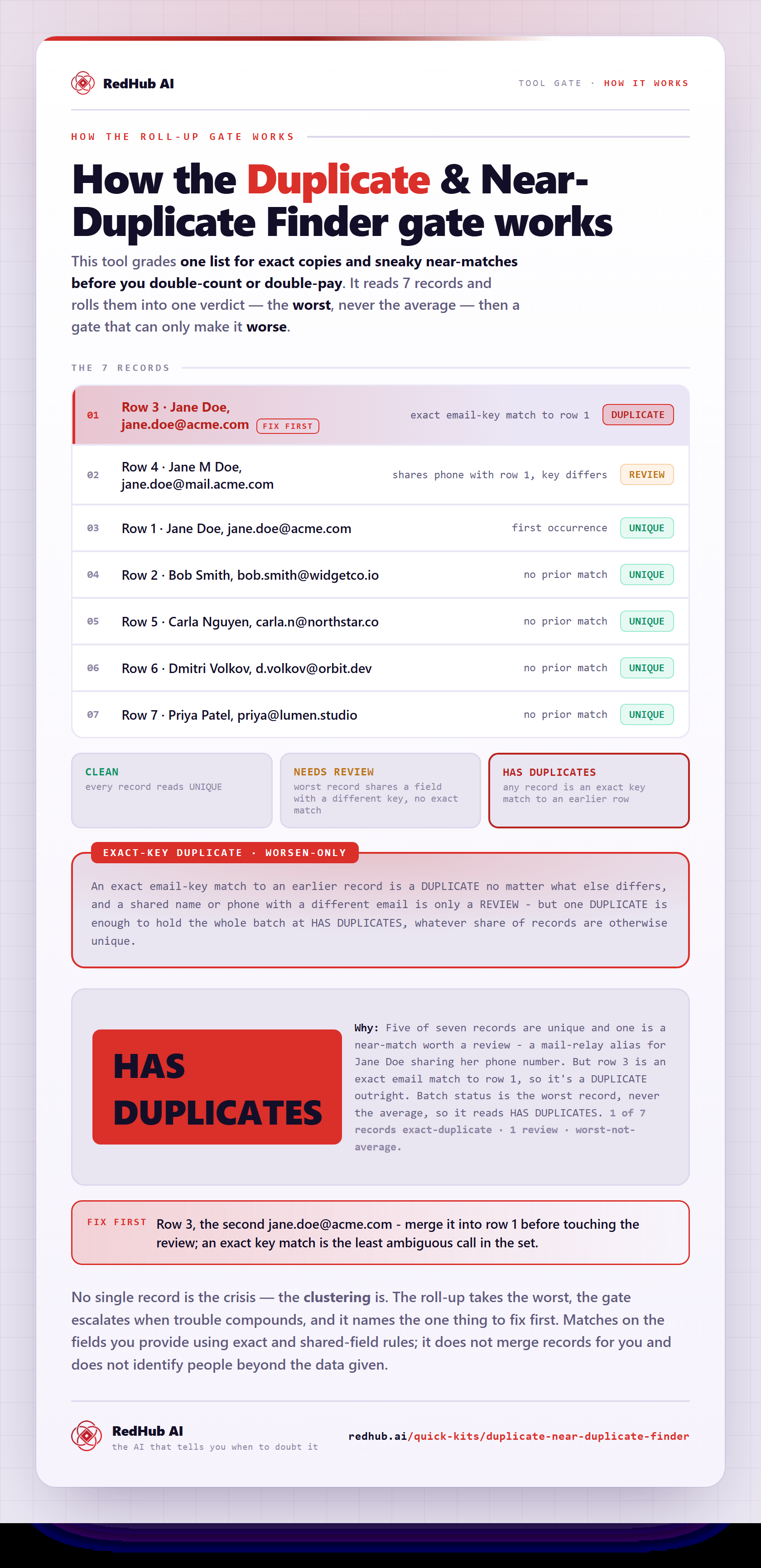
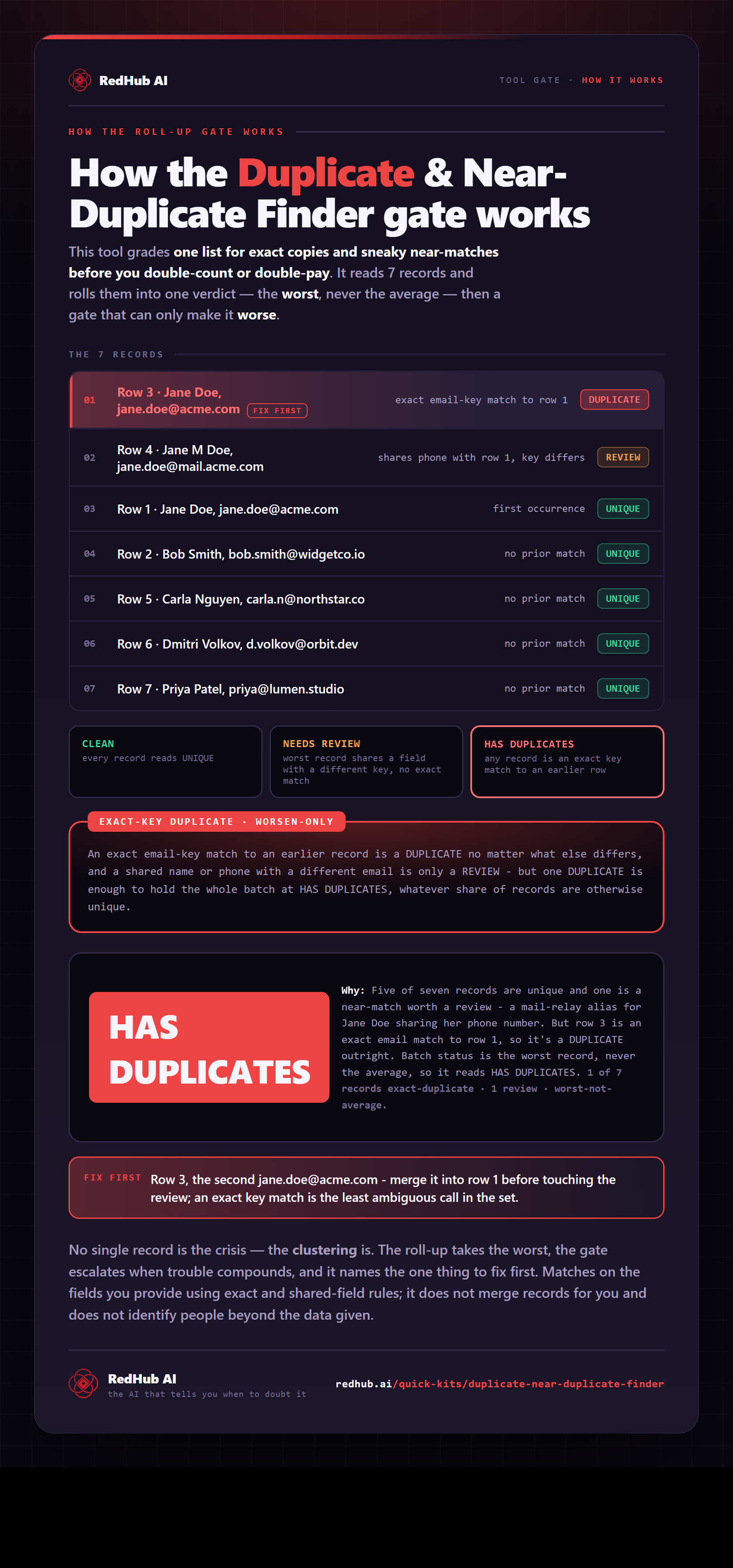
How the gate works, in one image
How the Duplicate & Near-Duplicate Finder scans 7 records for exact-key duplicates and near-duplicate collisions and reads worst-not-average — the same math the demo runs, as a diagram you can share or embed anywhere.
View & embed the full diagramThis is the live engine. The full workbook handles up to 200 rows with the same live formulas Repoint the columns at any list with a key and a couple of descriptive fields Readable helper columns — every verdict traces to an exact comparison
Get the kit — $49The standard
The key decides the duplicate. The other fields raise a review.
Exact-key gate
An exact match on the normalized key (email) is a DUPLICATE no matter what the name and phone say. A shared name or phone with a different key is only a REVIEW. The key can't be overruled, and a near-match can't be promoted to an exact duplicate.
First-occurrence rule
The first time a record appears it stays UNIQUE — it's the original you keep. Only later rows are flagged against it, so you're never shown both halves of a pair and left guessing which to remove.
Flag, never merge
It labels and points to the matching row. It never deletes, merges, or rewrites a record on your behalf. You keep the data and make the call — the kit just makes the call obvious.
How it works
Three columns in, three verdicts out.
- 01Paste your list into the Duplicate Finder tab — a key column (email) and a couple of descriptive ones (name, phone). Keep the headers.
- 02Each row is compared to the rows above it: same key → DUPLICATE; shared name or phone with a different key → REVIEW; nothing matching → UNIQUE.
- 03The Matches column points to the earlier row each flag pairs with, so you can see exactly what it duplicates.
- 04The Dashboard rolls it up to one batch verdict — CLEAN, NEEDS REVIEW, or HAS DUPLICATES — and the counts.
What you'll see
A verdict on every row, and one on the whole list.
UNIQUE
No earlier row matches. Keep it.
REVIEW
A shared name or phone with a different email. A likely near-duplicate — look before you act.
DUPLICATE
An exact key match to an earlier row. Treat as a duplicate.
Worked example: a 7-row list returns 5 UNIQUE, 1 REVIEW, 1 DUPLICATE — and a HAS DUPLICATES batch verdict, because one exact duplicate outranks the near-match.
Who it's for
Anyone cleaning a list before it does damage.
For
- Ops and admin staff cleaning a contact, lead, or vendor list before import
- Finance teams checking an invoice or payment list for double entries
- Anyone with a CSV export and a unique key who needs the duplicates surfaced, not auto-merged
Not for
- Fuzzy AI matching across millions of rows — this is a transparent, formula-based check up to a couple hundred rows
- Auto-merging or deleting records — it flags and leaves the decision to you
- Matching two separate lists against each other — that's the Two-List Reconciliation Kit
Not legal, accounting, or data-compliance advice. You keep the records; this kit never deletes or merges anything.
Pairs well with
Clean the list, then put it to work.
AI Document Extraction Kit
Turn invoices, receipts, and forms into structured rows — then run them through the Finder before they hit your system.
OpenFinance & Reporting Automation Kit
A self-checking reconciliation workbook for the monthly close — the heavier sibling when the records are financial.
OpenCRM Win-Back System
Reviving a dormant list? Dedupe it first so one person isn't contacted twice under two records.
OpenCommon questions
The answers buyers ask for first.
New to the document-ops line? Run the Document Processing Pipeline Diagnostic first — it scores your workflow across six stages and, where a stage is short, routes you to the exact drop that fixes your bottleneck.
Get the kit
Clean the list before it costs you.
- One .xlsx — Start Here, Dashboard, Duplicate Finder
- UNIQUE / REVIEW / DUPLICATE per row, batch verdict on the set
- No AI, no upload — your list stays in the file
Sold by RedHub AI LLC · Secured by Stripe · redhub.ai