What You Now Hold
The day you added a login, you started holding things that belong to other people. Nobody sat you down about it. It happened in a setup step.
This is an inventory, not a compliance check. It names no law and tells you nothing about what is required of you — it answers a plainer question you can actually check: why do you have each thing, and could you get rid of it?
one-time · instant download · yours to keep
01 — The problem
Nobody decided to become a custodian. It just happened.
The boxes accumulated one at a time
A sign-up form got an email. Then a name, because it looked friendlier. Then a phone number, in case support ever needed it. Nothing has ever read the phone number, and nobody remembers deciding to collect it — it arrived with a template.
Nobody wrote any of it down
There is no list of what your app stores about people. There is a database with tables in it, and the list lives in whoever last looked. That is fine right up until somebody asks you a direct question about it, and then it is the first thing you need and the thing you do not have.
And the copies went somewhere
Values end up in log files. They end up in prompts sent to an AI provider. Once they are there, deleting the row in your database removes the value from one place and leaves it in the others — which is why the delete button working is not the same as being able to get rid of something.
02 — What's inside
Four questions per field. You never enter a value.
Whether it is anybody's information
A theme preference and a row count are not. Those rows are told to leave it alone and never count against you — treating every column as a liability is how people stop reading the ones that are.
Why you have it
A feature genuinely uses it, it seemed useful when you added the box, or nothing has ever read it. The third answer is more common than anybody expects and it is the cheapest thing on the list to fix.
Whether you could get rid of it
If the person asked, could you? And separately: is the value also sitting in a log file or a prompt you already sent, somewhere you could not go and remove it from?
You enter the name of a field — “email address”, “date of birth” — and four answers about it. There is nowhere to put a value and the sheet never sees one.
03 — The standard
Three rules it will not bend for you.
It names no law and makes no determination
Not one statute, country or rule appears anywhere in the product — not in the sheet, not in the engine, not in the worked example. It is an inventory of what you hold. If you need to know what is required of you, that is a question for a lawyer and this is not one. What it gives you is the list you would need first either way.
Deleting the row is not the same as getting rid of it
A field can be needed, justified, and have a delete button that works perfectly, and still read CANNOT GET RID OF IT — because the value is also in a log file, or in a prompt you sent months ago. Those rows are counted separately on the dashboard, because it is the part almost nobody has thought about. Two of the ten fields in the worked example are exactly this.
An answer you could not find is scored as the worst it could have been
Not a guess about what is likely — the worst, because an answer you cannot produce is not evidence. Stated that way it also cannot be gamed: writing cant_find can never get you a better result than telling the truth would have. Where an unfound answer could not have changed the row either way, it is not counted against you and the row says so.
04 — How it works
An afternoon, once, and then rarely.
01
Open your table editor and write down every column that could be about a person. Field names only — never a value.
02
Mark which ones actually are. Settings and counts are told to leave alone, and that usually removes a third of the list immediately.
03
Answer the three remaining questions from what you know. Answer cant_find honestly where you have to.
04
Start with the fields you hold and never use. Deleting a column is a much smaller job than working out how to retract a value from somewhere you cannot reach.
05 — What you'll see
The worked example, live.
Ten fields a small app ends up holding. Compare F-01 and F-05: both needed by a feature, both with a working delete, and one of them you still could not get rid of. Two more are told to leave alone entirely.
Try it on the worked example
Ten fields a small app ends up holding. Compare F-01 and F-05 — both needed, both deletable, and one of them you still could not get rid of.
| Field | A person's? | Why you have it | Copies you can't reach | Can delete | Destination |
|---|---|---|---|---|---|
F-01 Email address | KEEP IT a feature needs this, and if the person asked you to get rid of it you could | ||||
F-02 Full name | KEEP IT a feature needs this, and if the person asked you to get rid of it you could | ||||
F-03 Date of birth | MORE THAN YOU NEED you are holding this because it seemed useful, not because a feature needs it | ||||
F-04 Phone number | MORE THAN YOU NEED you are holding this and nothing in your app has ever used it | ||||
F-05 Support message text | CANNOT GET RID OF IT the delete works, but the value is also sitting somewhere you cannot go and remove it from - deleting the row is not the same as getting rid of it | ||||
F-06 Uploaded profile photo | CANNOT GET RID OF IT if the person asked you to get rid of this, you could not - and that is true however good a reason you have for holding it | ||||
F-07 Theme preference | NOT ABOUT A PERSON this is not anybody's information, so there is nothing here to justify or get rid of | ||||
F-08 IP address recorded at sign-up | MORE THAN YOU NEED you are holding this and nothing in your app has ever used it | ||||
F-09 Home address | CANNOT GET RID OF IT the delete works, but the value is also sitting somewhere you cannot go and remove it from - deleting the row is not the same as getting rid of it | ||||
F-10 Number of documents they have | NOT ABOUT A PERSON this is not anybody's information, so there is nothing here to justify or get rid of |
Verdict
HOLDING IT FOREVER
Something here you could not get rid of if the person asked you to.
Fix first F-09 — the delete works, but the value is also sitting somewhere you cannot go and remove it from - deleting the row is not the same as getting rid of it
6 of 10
fields that need a decision
60% of the fields listed
3
you could not remove if asked
however good the reason for holding them
2
where deleting the row is not enough
the copies nobody thinks about
2
told to leave alone
not anybody's information
This is an inventory, not a compliance check. None of the four numbers above changes the verdict, and fields that read NOT ABOUT A PERSON are never counted against you.
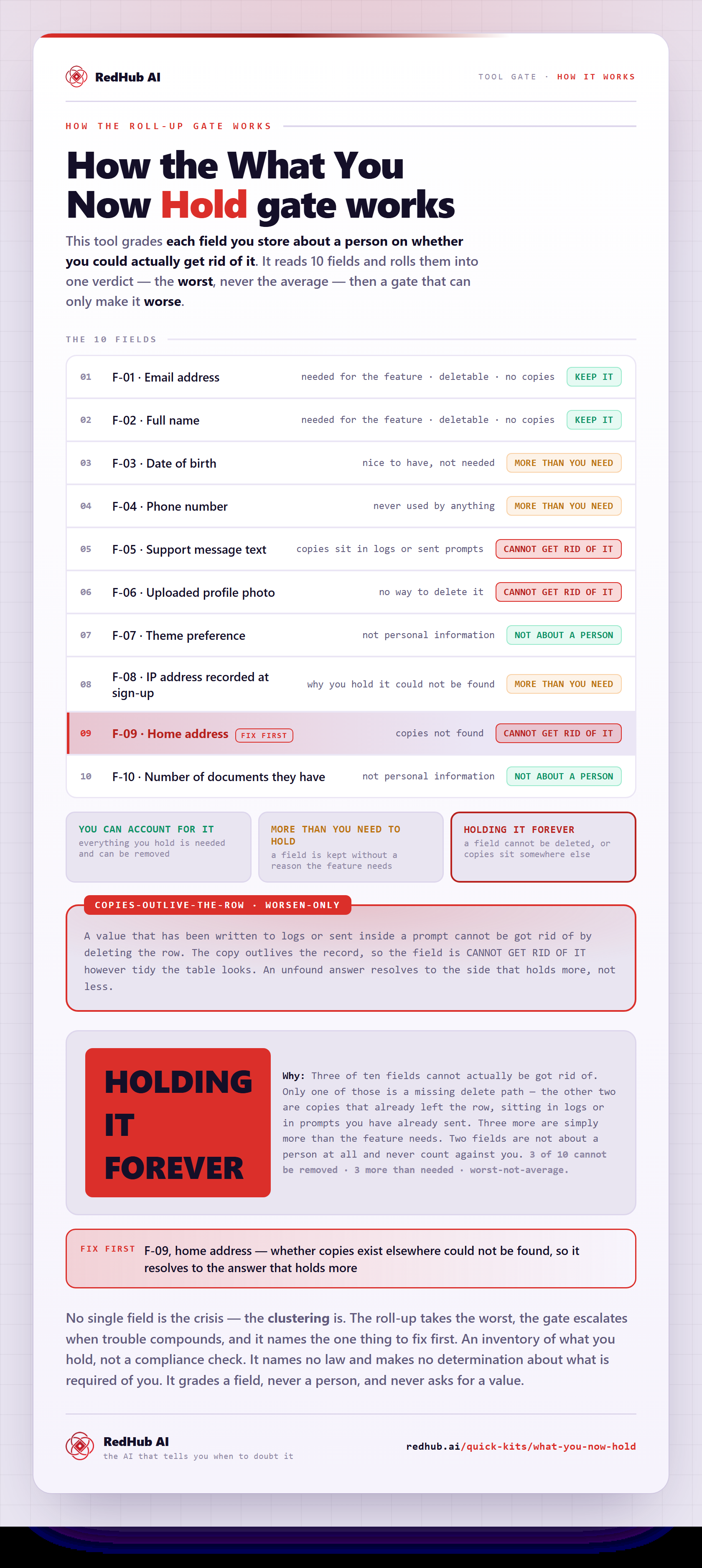
How the gate works, in one image
See how ten stored fields roll into one verdict - and why a copy in your logs outlives the row you deleted.
View & embed the full diagramThis is the live engine. 60 rows, the same formulas, in a file you keep Start Here tab that explains every answer in plain words Dashboard with the verdict, the counts, and what to fix first
Get the kit — $5906 — Who it's for
For the person who did not plan on being a custodian.
Buy this if
- You added a login and have never sat down with the list of what you now store.
- You could not answer "what do you hold about me?" without opening the database.
- You have pasted user text into an AI prompt and not thought about where it went.
- Somebody has asked you a direct question about their data and you had to go and look.
Skip it if
- You already keep a maintained record of what you store and why.
- Your app has no users and stores nothing about anybody.
- You want to know whether you are compliant with a particular law — that is a lawyer's answer and this deliberately does not give it.
What this is not
This is an inventory of what you hold, not a compliance assessment. It names no law and makes no determination about what is required of you or about anybody else. It connects to nothing, sees no data, and never asks you to enter a value — only the name of a field. It grades your own record of what you store and never a person, and it does not score, rank, or profile anybody. It is not legal advice — it reads back what you tell it, using rules you can see in the formulas. If you need to know what the law requires of you, ask a lawyer.
07 — Works alongside
Where this sits.
The rest of the line reads how your app behaves. This one reads what it kept.
The Browser Line Read-Off
$59The keystone of the same line. It reads what your app hands the browser; this one reads what your database is holding on to afterwards.
The Data Model Sanity Bench
$69The shape of your tables. Run it alongside this one — it walks the same column list from the other side, asking who enforces the rules rather than whose information it is.
Vibe-Coded App Pre-Launch Security Gate
$79The launch-moment go/no-go across six controls. Knowing what you hold is the input to two of them, and this inventory is where that list comes from.
08 — Common questions
Before you buy.
No, and it deliberately does not try. It names no law, no country and no rule, and it makes no determination about what is required of you — that is a question for a lawyer and this is not one. What it does is plainer and genuinely useful on its own: an inventory of what you hold, why you have each thing, and whether you could get rid of it if the person asked. Whatever anybody eventually requires of you, you will need that inventory first.
Because needing something and being able to remove it are separate questions. A field can be completely justified and still land at the bottom if you could not delete it when asked — that is true however good the reason for holding it, and it is the one thing on the sheet a better reason cannot fix.
Because deleting the row is not the same as getting rid of the value. If it also sits in a log file, or in a prompt you sent to an AI provider months ago, then removing it from your database removes it from one place and leaves it in the others. That is the part almost nobody has thought about, and those rows are counted separately so you can see how many there are.
No, and there is nowhere to. You enter the name of a field — "email address", "date of birth" — and four answers about it. The sheet never sees a value, connects to nothing, and uploads nothing.
It matters and the sheet says so. A theme preference or a row count is not anybody's information, and those rows read NOT ABOUT A PERSON and are never counted against you. Treating every column in a database as a liability is how people stop reading the ones that actually are.
The fastest wins are usually the fields you are holding without needing — a box you added to a form once and nothing has ever read. Deleting a column is a smaller job than working out how to retract a value from somewhere you cannot reach, and it shortens the list before you get to the hard part.
Get the Read-Off
Find out what you are actually holding.
- One .xlsx — Start Here, Dashboard, Inventory
- 60 rows with dropdowns and live formulas
- A worked ten-field example, already filled in
- Names no law — an inventory, not a compliance check